
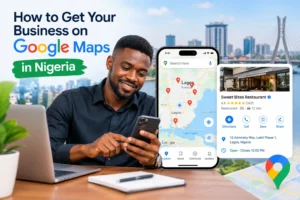
If you run a business in Nigeria, getting your business on Google Maps can make it easier for nearby customers to find you, call you, visit your location, or learn more about what you offer.
When someone searches Google for terms such as “restaurant near me,” “tailor in Lagos,” “plumber in Abuja,” “salon in Port Harcourt,” or “phone shop near me,” Google can display local businesses on Search and Google Maps.
The good news is that creating a Google Business Profile is free for eligible businesses.
In this guide, you will learn how to get your business on Google Maps in Nigeria, how to claim an existing listing, how verification works, what information to add, and how to improve your profile after it goes live.
This is also an important part of local SEO for businesses in Nigeria.
Before You Create Your Google Business Profile
Before starting, have these details ready:
- Your real business name
- Your primary business category
- Your business address, if customers visit you
- Your service areas, if you travel to customers
- A working business phone number
- Your business website, if you have one
- Your regular opening hours
- A few genuine photos of your business
- Access to the Google account that will manage the profile
- Information needed for Google’s verification process
Important: Don’t create a second listing before checking whether Google already has a profile for your business. Claiming an existing profile may be more appropriate than creating a duplicate.
What Is Google Business Profile?
Google Business Profile is Google’s free business listing system for eligible businesses that interact with customers in person. It allows a business to provide information such as its:
- Business name
- Address
- Phone number
- Opening hours
- Website
- Business category
- Photos
- Services
- Customer reviews
- Service areas
Once your profile is added and verified, customers can find your business through Google Search and Google Maps. Google also allows businesses to update their information and interact with customers through their profiles.
You may still hear people call it Google My Business (GMB). Google changed the product’s name to Google Business Profile, but “Google My Business Nigeria” remains a common search phrase.
Why Should a Nigerian Business Be on Google Maps?
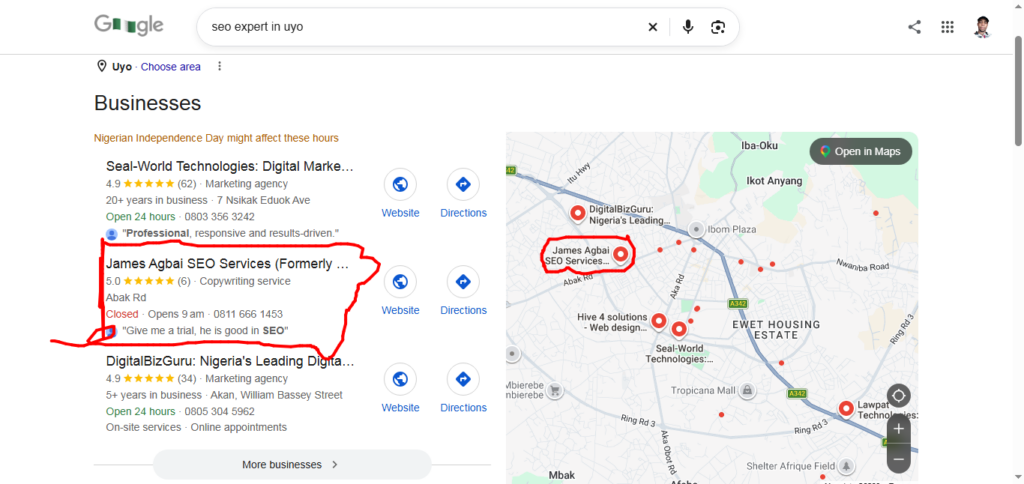
Having a presence on Google Maps can help customers discover your business when they are searching for products and services locally. For example, imagine someone in Ikeja searching for: “bakery near me”
A well-maintained business profile can provide useful information about eligible local businesses, including their location, opening hours, phone number, website, photos and reviews. For a business owner, this can make it easier for potential customers to:
- Find your physical location
- Get directions
- Call your business
- Visit your website
- Check your opening hours
- See photos
- Read customer reviews
- Understand the products or services you offer
Google states that complete and accurate business information can improve a business’s chances of appearing in relevant local searches.
However, being listed on Google Maps does not guarantee that your business will appear first for every search. Local visibility depends on several factors, and Google does not offer a legitimate shortcut that guarantees a particular ranking.
Who Can Add a Business to Google Maps?
Before creating a profile, make sure your business is eligible. Generally, a business needs to have in-person contact with customers during its stated business hours. Google provides Business Profiles for eligible storefront businesses and service-area businesses.
Examples may include:
- Restaurants
- Shops
- Supermarkets
- Salons
- Barbershops
- Hotels
- Clinics and other eligible local practices
- Repair businesses
- Plumbers
- Cleaning companies
- Photographers
- Construction-related services
- Other eligible businesses that meet customers in person
An online-only business that never has in-person contact with customers may not qualify for a Business Profile. This distinction is important because creating several fake listings or using an address where your business does not actually operate can create problems with your profile.
How to Get Your Business on Google Maps in Nigeria
There are two common situations. Your business may not yet have a Google Business Profile, or a profile may already exist but you do not control it. Let’s look at both.
Step 1: Search for Your Business on Google Maps
Before creating a new listing, search for your business. Open Google Maps and search for: Your business name + your city. For example: ABC Fashion Lagos
Look carefully at the results. If you find your business, check whether the information is correct.
You may discover that Google already has a listing for your business. This can happen even if you did not create the listing yourself. If you find an existing unclaimed listing, you may be able to claim it instead of creating another profile.
Google specifically recommends claiming an existing profile when one already represents your business.
Step 2: Add Your Business if It Does Not Exist
If you cannot find your business on Google Maps, you can create a Business Profile. Google’s current process allows eligible businesses to add their business through its Business Profile system. You can start from Google’s official Business Profile page and follow the instructions to add your business.
You will generally need to provide information such as your business name, category and location. Make sure the information you enter is genuine and matches how your business is actually represented in the real world.
Google says businesses should represent themselves consistently and accurately.
Step 3: Enter Your Real Business Name
One common mistake business owners make is stuffing keywords into their business name. For example, suppose your real business name is: Adeola Fashion House
Do not change the name simply to something like: Best Tailor in Lagos | Affordable Tailoring Services Lagos. unless that is genuinely the business’s real-world name.
Google’s guidelines say the business name should reflect the business’s real-world name. Adding unnecessary information to the name can cause problems, including possible suspension.
Your SEO keywords should be used naturally in appropriate parts of your online presence rather than forcing them into the business name.
Step 4: Choose the Right Business Category
Your primary category helps Google understand what your business does. Choose the category that most accurately represents your main business.
For example, a business may need to choose a category related to its actual primary activity rather than selecting several unrelated categories simply because they contain popular keywords.
Google recommends using the fewest categories necessary to describe the business’s core operations.
This is an important part of Google Maps SEO in Nigeria. Do not select a category because you think it will bring more traffic if it does not accurately describe your business.
Step 5: Add Your Business Address
If customers visit your physical location, enter the correct business address. For example: Shop 12, Example Plaza, Ikeja, Lagos, Nigeria
Use the actual location where your business operates. Google’s guidelines state that businesses should provide an accurate, precise address. Virtual offices and certain mailing addresses do not qualify simply because they provide a convenient address for listing purposes.
If Google cannot accurately identify your street location, you may also be able to position your business’s map marker appropriately.
For Nigerian businesses, this is particularly useful because addresses can sometimes be described using estates, plazas, landmarks, streets and nearby areas.
Nevertheless, use your genuine business location and provide useful address details rather than inventing an address.
Step 6: Choose the Correct Business Type
Not every business operates from a shop customers visit. Google distinguishes between storefront businesses, service-area businesses, and hybrid businesses.
A service-area business travels to customers rather than serving them at its listed business address. For example, a plumber may travel to customers’ homes to provide services.
A hybrid business may both receive customers at its location and travel to customers. If customers do not visit your business address, Google says you should remove the public address and use a service area instead.
This is important for Nigerian businesses such as:
- Mobile beauty professionals
- Cleaning companies
- Plumbers
- Electricians
- Event vendors
- Home repair businesses
- Some delivery-based services
Do not create a fake shop address just because you want your business to appear on a particular part of Google Maps.
Step 7: Set Your Service Area
If you operate a service-area business, tell Google where you actually provide your services. You can specify areas such as cities or other supported geographic areas.
Google currently allows service-area businesses to specify up to 20 service areas and recommends keeping the overall service area within a reasonable travel distance from the business. For example, a Lagos-based cleaning company might serve selected parts of:
- Ikeja
- Yaba
- Surulere
- Lekki
- Victoria Island
Only select areas you genuinely serve. Accurate service areas are better than listing every city in Nigeria simply to attract searches.
Example: Setting Up a Google Business Profile for a Lagos Service Business
Imagine you run a cleaning company based in Ikeja, Lagos. Your business:
Business name: CleanPro Services
Business type: Service-area business
Base location: Ikeja, Lagos
Services: Residential cleaning, office cleaning and post-construction cleaning
Service areas: Ikeja, Yaba, Surulere, Lekki and Victoria Island
If customers do not visit your office and your team travels to customers, you should not create a fake storefront address simply to appear on Google Maps.
Instead, configure the profile according to how the business actually operates. For example:
| Profile field | Example |
|---|---|
| Business name | CleanPro Services |
| Primary category | Cleaning service |
| Business type | Service-area business |
| Service areas | Ikeja, Yaba, Surulere, Lekki, Victoria Island |
| Phone | Your real business number |
| Website | Your actual business website |
| Hours | Hours when customers can contact the business |
The important point is not to copy this exact setup. Your category, address and service areas should reflect your actual business.
Google currently allows service-area businesses to specify up to 20 service areas and recommends keeping the overall area within roughly two hours of driving time from the business base.
What I Commonly See Nigerian Businesses Get Wrong
While working on local SEO projects, some of the most common Google Business Profile problems I see include:
- Creating duplicate listings
- Using fake addresses
- Adding keywords to business names
- Choosing incorrect categories
- Using inconsistent phone numbers
- Ignoring reviews
- Creating a profile without improving the website
In many cases, the issue is not that the business lacks a Google Business Profile. The problem is that the profile, website and business information are not working together.
Google Maps visibility usually improves when the business information is accurate, consistent and supported by a useful website and broader local SEO work.
Step 8: Add Your Phone Number and Website
Add a phone number that customers can use to contact your business. If you have a website, add the website associated with your business.
Make sure the information is current. A potential customer should not click your listing and discover that the phone number is no longer active or the website leads somewhere unrelated.
Consistency also matters across your website, social media profiles and other business listings. For example, if your business is called ABC Electronics, avoid using completely different names, addresses and phone numbers across your major online profiles unless there is a genuine reason for the difference.
Step 9: Verify Your Business Profile
Verification is one of the most important parts of setting up your Google Business Profile. Google requires verification so it can confirm that you are authorised to represent the business.
The verification options available to you are determined automatically by Google and can vary depending on factors such as your business, region and other information associated with the profile.
Depending on what Google offers for your profile, verification may involve methods such as:
- Phone or text
- Video
- Other verification methods provided by Google
Follow the verification instructions shown inside your Business Profile. Do not pay someone who claims they can sell you a special Google verification code. If Google asks you to complete a verification process, use the official process associated with your Business Profile.
Step 10: Complete Your Google Business Profile
After verification, do not stop at simply getting your business onto Google Maps. Complete as much relevant information as possible. Consider adding:
- Business hours
- Holiday hours where appropriate
- Business description
- Services
- Products where available
- High-quality photos
- Website
- Phone number
- Service areas
- Accurate location
- Relevant attributes
Google says businesses can update information such as their address, hours, contact details and photos to help customers find and understand the business. A complete profile gives customers more information before they decide whether to contact or visit you.
Need Help Optimizing Your Google Business Profile?
Creating a Google Business Profile is only the first step. Your category, business information, service areas, reviews, website and broader local SEO presence all need to work together.
If you’re a Nigerian business owner and you’re not sure whether your Google Business Profile is set up correctly, I can review it and identify potential local SEO issues.
Need a Google Business Profile audit or local SEO help?
How to Improve Your Google Maps Visibility in Nigeria
Getting your business listed is only the first step. If your goal is to attract customers from local searches, treat your Business Profile as an important part of your wider local SEO strategy.
1. Keep Your Information Accurate
Check your profile regularly. If you move from one location to another, change your phone number or change your opening hours, update the information. Incorrect information can frustrate customers and may reduce trust in your business.
2. Add Real Business Photos
Photos can help potential customers understand your business before visiting. Depending on your business, useful photos might include:
- Shopfront
- Office
- Interior
- Products
- Staff
- Equipment
- Completed projects
- Food
- Services being performed
Use genuine images of your business rather than unrelated stock photos.
3. Ask Genuine Customers for Reviews
Customer reviews can provide useful social proof. After a genuine customer has purchased from you, you can invite them to leave an honest review through your Google Business Profile.
Do not buy fake reviews or create reviews for yourself. The goal should be to collect genuine feedback from real customers. Respond professionally to both positive and negative reviews. A simple response such as thanking a customer for their feedback can show that the business is active and paying attention.
Example:
Hi [Customer Name], thank you for choosing [Business Name]. If you were happy with our service, we’d appreciate an honest review on Google. Your feedback helps other customers understand what to expect from us.
[Google review link]
4. Use a Clear Business Description
Your business description should explain what you do and who you serve.
For example:
“We provide residential and commercial cleaning services in Lagos, including office cleaning, deep cleaning and post-construction cleaning.”
The description should be written for people first. Avoid filling it with repeated keywords. Google’s guidelines say business descriptions should provide useful information about the products or services offered and should be honest and relevant.
5. Keep Your Website Consistent
Your Google Business Profile should support your website, not operate separately from it. Make sure your website clearly communicates:
- Business name
- Location or service area
- Phone number
- Products or services
- Contact information
- Business details
How Does Google Decide Which Businesses Appear on Google Maps?
Getting listed on Google Maps does not automatically mean your business will appear at the top of every local search. Google says local results are primarily influenced by relevance, distance and prominence.
1. Relevance
Relevance is how closely your Business Profile matches what the person is searching for. For example, a profile for a plumber is more relevant to a search for “plumber in Ikeja” than a profile for a clothing store.
This is why your primary category, services, business information and website should accurately describe what your business actually does.
2. Distance
Distance refers to how far a business is from the person searching or from the location included in the search.
This means a business cannot simply add “Lagos,” “Abuja” or dozens of other locations to its profile and expect to rank everywhere. Your actual location and service area matter.
3. Prominence
Prominence relates to how well-known a business is. Google says prominence can be influenced by information such as links from other websites and reviews.
This is where Google Business Profile optimisation connects with broader local SEO. Your strategy should therefore go beyond filling out your profile. Build a trustworthy business presence across your website, reviews, relevant directories and other legitimate online mentions.
Important: Google says there is no way to request or pay for a better local ranking. Be cautious of anyone who guarantees a specific Google Maps position.
Why Your Business May Not Be Showing on Google Maps
Include:
- verification issues
- duplicates
- wrong category
- policy issues
- address problems
- recent changes
- local competition
How Long Does It Take to Appear on Google Maps?
There is no single guaranteed timeframe for every business. Google may need to review information or complete verification before your profile becomes fully available or changes appear.
Some edits can also take time to be reviewed. For example, Google says approved service-area changes can take up to 48 hours to appear on a Business Profile.
If your profile does not immediately appear exactly where you expect, avoid repeatedly creating new listings. First check your existing profile, verification status and business information.
What If Your Business Is Already on Google Maps?
Do not automatically create a second listing. Search for the existing business profile and determine whether you can claim it.
Google provides a process for claiming an existing unverified Business Profile. If someone else has already verified it, an authorised business representative can request ownership through Google’s process.
Multiple profiles for the same business location can create unnecessary problems. Google’s guidelines generally call for one profile per business location, with specific exceptions for certain business structures.
Common Google Maps Mistakes Nigerian Businesses Should Avoid
Avoid these common mistakes when creating and managing your Google Maps listing:
- Using a fake address: Do not use an address where your business does not actually operate.
- Keyword stuffing your business name: Use your real-world business name instead of adding unnecessary search keywords.
- Creating duplicate profiles: Do not create multiple listings simply to target different keywords, locations, or neighbourhoods.
- Choosing irrelevant categories: Select business categories that accurately describe your main products or services.
- Buying fake reviews: Focus on earning genuine feedback from real customers.
- Ignoring your profile after verification: Keep your business information, opening hours, phone number, and other details up to date.
- Creating fake service areas: Only list locations or areas where your business genuinely provides services.
These practices are not shortcuts to better local SEO. They can create trust, accuracy, and Google Business Profile policy problems.
Is Google Maps Free for Nigerian Businesses?
For eligible businesses, creating or claiming a Google Business Profile is free. Google explicitly states that businesses can add or claim their profile at no charge.
You do not need to pay Google simply to create a basic Business Profile.
However, you may choose to spend money on other forms of marketing, such as website development, professional photography, SEO services or Google advertising.
Those are separate from creating the basic Business Profile.
Beware of Google Maps Verification Scams
Creating or claiming an eligible Google Business Profile is free. Be careful if someone contacts you claiming to be from Google and asks you to pay simply to:
- verify your Business Profile
- keep your listing active
- receive a verification code
- prevent your listing from being removed
- “guarantee” a Google Maps ranking
Google warns businesses about impersonation scams and says it does not charge businesses to maintain their Business Profile, complete verification or have a profile reinstated. Google also says it will not ask for your one-time password (OTP) or PIN.
If you hire an SEO agency or freelancer to manage your profile, make sure you retain ownership and appropriate access to the Business Profile.
Google Maps and Local SEO in Nigeria
Getting your business on Google Maps is one part of a larger local SEO strategy.
Local SEO involves improving your online presence so people searching for products and services in a particular location can discover your business.
For a Nigerian business, this may involve:
- Google Business Profile optimisation
- A useful business website
- Consistent business information
- Customer reviews
- Local content
- Relevant Nigerian location pages
- Quality backlinks and business mentions
- Accurate online directories
- Useful photos and business information
Google itself says complete and accurate information can help businesses appear in relevant local searches.
If you want to go beyond Google Maps, see our Local SEO for Businesses in Nigeria: Complete Guide for a broader step-by-step approach to building local search visibility.
Final Checklist: Getting Your Business on Google Maps
Before considering your Google Business Profile complete, check that you have:
- Confirmed that your business is eligible
- Searched Google Maps for an existing listing
- Claimed an existing profile where necessary
- Added your business if no listing exists
- Used your real business name
- Selected an accurate primary category
- Added your genuine business address where applicable
- Set your service area if you operate a service-area business
- Added your business phone number
- Added your website
- Completed Google’s verification process
- Added accurate opening hours
- Added a useful business description
- Uploaded genuine business photos
- Encouraged genuine customers to leave honest reviews
- Checked your profile regularly for outdated information
Conclusion
Learning how to get your business on Google Maps in Nigeria is not complicated, but doing it correctly matters.
Start by checking whether your business already has a listing. If it does, claim it rather than creating a duplicate. If it does not, create a Google Business Profile using accurate information about your real business.
Choose the correct business category, provide a genuine address or service area, complete verification and keep your profile updated.
Most importantly, remember that getting listed on Google Maps is only the beginning. A complete profile, accurate business information, genuine customer reviews, useful photos and a strong website can all form part of a broader local SEO strategy.
For Nigerian businesses that depend on local customers, Google Maps can be an important part of becoming easier to discover when people search for the products and services they need.
Author Profile

-
James Agbai is an SEO Specialist and Content Strategist with over five years of experience helping businesses, bloggers, startups, and service providers improve their online visibility through ethical, data-driven SEO.
He specializes in technical SEO, content strategy, keyword research, and on-page optimization, with a focus on building sustainable organic growth rather than relying on short-term tactics.
Latest entries
 CONTENT SEOOctober 22, 2026Why Your Blog Posts Are Not Ranking on Google: 15 Reasons and How to Fix Them
 CONTENT SEOOctober 22, 2026How to Build an SEO Topic Cluster (Step-by-Step Guide)
 CONTENT SEOOctober 17, 2026SEO Content Strategy for Nigerian Businesses: A Complete Guide to Getting Found on Google
 TECHNICAL SEOOctober 17, 2026How to Fix 404 Errors in WordPress: A Complete Step-by-Step Guide