
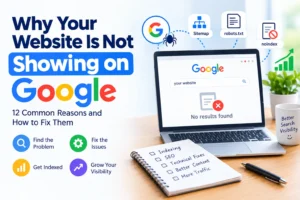
Have you published your website or blog, but it is nowhere to be found on Google? You are not alone. Many website owners experience this problem, especially when their websites are new. You may have written useful articles, designed attractive pages, and shared your website with friends, yet Google still does not show it in search results.
The good news is that your website may not have a serious problem. Google might not have discovered it yet, some technical settings might be preventing it from appearing, or your pages might need more useful content and better search engine optimization (SEO).
Understanding why your website is not showing on Google is the first step toward solving the problem.
In this guide, you will learn the most common reasons websites do not appear on Google, how to check whether your pages are indexed, and the practical steps you can take to improve your website’s visibility.
Whether you run a WordPress blog, a business website, an online store, or a newly launched website, this guide will help you understand what to check and what to do next.
1. Google Has Not Discovered Your Website Yet
One of the most common reasons a website does not appear on Google is that Google has not discovered its pages.
Google uses automated software called crawlers to find and explore publicly accessible web pages. These crawlers follow links, examine sitemaps, and discover new or updated content.
If your website is new, Google may not know that it exists. This is particularly common when a website has few external links and no sitemap submitted through Google Search Console.
For example, imagine you have just launched a food blog. You publish ten recipes but do not link to them from your homepage or submit a sitemap. Google may take longer to discover those pages.
How to fix it
Start by creating a Google Search Console account and verifying ownership of your website.
Next, generate an XML sitemap. Most modern content management systems, including WordPress with common SEO plugins, can create one automatically.
Your sitemap usually contains the URLs of important pages you want search engines to discover.
Submit the sitemap through the Sitemaps section of Google Search Console. You should also make sure your important pages are linked from your homepage, navigation menu, or relevant articles.
Remember that submitting a sitemap does not guarantee that Google will index every page. It simply helps Google discover your content.
2. Your Website Is Not Indexed by Google
Crawling and indexing are two different processes.
Crawling happens when Google visits a page to examine its content. Indexing happens when Google processes that information and decides whether to include the page in its search index.
A page can be crawled without being indexed. Similarly, a website can be accessible online without having any pages included in Google’s index.
This explains why typing your website address into a browser may work perfectly even though your website does not appear in search results.
How to check whether Google has indexed your website
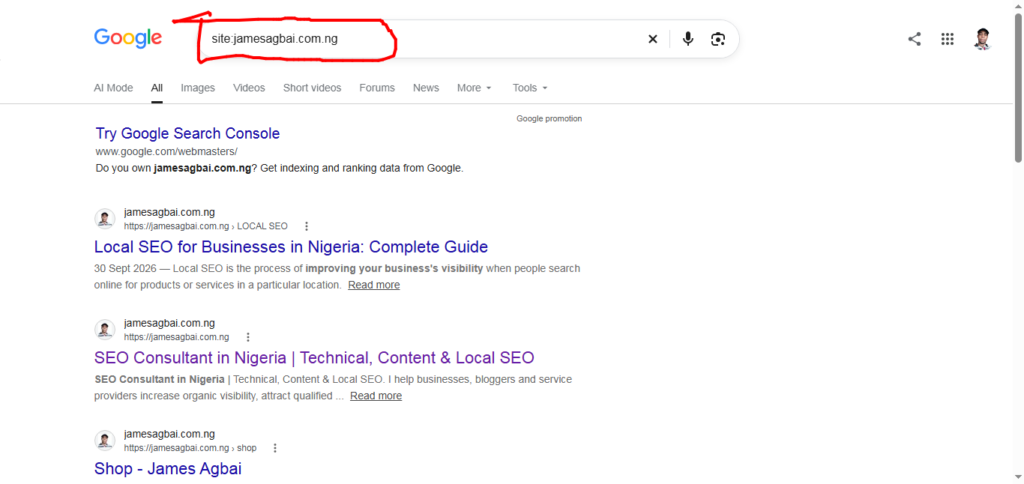
Open Google Search and enter:
site:yourwebsite.com
Replace yourwebsite.com with your actual domain.
For example, you might search for site:example.com.
If results appear, Google has indexed at least some pages from your domain. If nothing appears, your website may not be indexed, although this search method is not a complete diagnostic tool.
For a more reliable check, use the URL Inspection tool in Google Search Console.
Enter the exact URL of the page you want to check. Search Console will show whether Google knows about the page and whether it is indexed.
How to fix indexing problems
If the page is not indexed, read the reason provided by Search Console. It may indicate that Google has not discovered the page, the page contains a noindex directive, or Google considers another URL the preferred version.
Address the specific issue instead of repeatedly requesting indexing without making any changes.
Need Help Finding Your Website’s Indexing Problem?
Not sure why Google is excluding your pages? Start with Google Search Console to check the indexing status of your important URLs. If the reports are confusing or the problem persists, professional technical SEO support can help you identify the cause.
3. Your Website Has a Noindex Tag
A noindex tag tells search engines that a page should not be included in their search results.
This setting is useful for private or unimportant pages that you do not want people to find through Google. However, it can become a problem when it is accidentally applied to your homepage, blog posts, or important service pages.
For example, some website platforms have a setting that discourages search engines from indexing a site while it is under development. If that setting remains enabled after launch, your website may continue to be excluded from Google.
How to fix it
If you use WordPress, check your search engine visibility settings. Depending on your version and configuration, you may find an option that discourages search engines from indexing the site.
Also check the settings of your SEO plugin and inspect the page’s robots meta tag.
A directive such as the following can prevent a page from being indexed:
<meta name="robots" content="noindex">
If the page should appear on Google, remove the unintended noindex directive and confirm that Google can crawl the page.
Do not remove noindex settings indiscriminately. Some pages, such as internal search results or private account pages, may correctly need to remain outside Google’s index.
4. Your Robots.txt File Is Blocking Google
A robots.txt file provides instructions to search engine crawlers about which parts of a website they may access.
If this file accidentally blocks important sections of your website, Google may struggle to crawl those pages.
For example, a rule that blocks your entire website could prevent Googlebot from accessing your content.
How to fix it
Visit yourwebsite.com/robots.txt to view your website’s robots.txt file.
Check whether the rules unintentionally block important pages or directories. You can also use Google Search Console and its available inspection tools to investigate crawling problems.
One important distinction is that robots.txt and noindex do different jobs. Robots.txt controls crawling, while noindex instructs a search engine not to include an accessible page in its index.
Blocking a page in robots.txt does not reliably remove it from search results. Google may still know about a blocked URL from other sources.
If you are unsure about the rules in your robots.txt file, ask your website developer or hosting provider to review them before making changes.
5. Your Website Is Too New
New website owners often expect their websites to appear on Google immediately after publication.
Unfortunately, indexing does not always happen instantly.
Google needs to discover a page, crawl it, process its content, and decide whether to include it in the index. The time required varies depending on the website, the page, and Google’s crawling and indexing processes.
A newly published page may appear within days, but some pages take longer. Requesting indexing does not guarantee immediate inclusion.
How to fix it
First, ensure that your website is accessible and that Google can crawl its important pages.
Submit your sitemap, add internal links, and use URL Inspection to request indexing for important new or updated URLs.
Then monitor the results in Search Console.
Avoid submitting the same URL repeatedly without addressing any underlying problems. Give Google time to process your changes, and focus on making your website easy to discover and useful to visitors.
6. Your Content Is Thin, Repetitive, or Not Helpful Enough
Technical problems are not the only reason your website may be missing from Google.
Google does not guarantee that every accessible page will be indexed. It may decide not to index pages that provide limited value, duplicate other content, or do not offer a useful experience.
For example, imagine you publish twenty articles that repeat almost identical information with only a few words changed. These articles may provide little additional value to readers.
Similarly, a page containing only a few generic sentences may not adequately answer the question it targets.
How to fix it
Create content that solves real problems for your audience.
Before publishing an article, ask yourself:
- Does it answer the reader’s main question?
- Does it explain the topic clearly enough for a beginner?
- Does it provide useful examples, instructions, or original insights?
- Is it different from other pages on my website?
- Can readers trust the information?
For instance, an article about fixing website indexing problems should explain how to check indexing, identify common errors, and resolve them. Simply repeating the phrase “website not showing on Google” will not provide the same value.
Quality matters more than publishing a large number of weak articles.
There is no official word count that guarantees indexing or high rankings. Write enough to address the subject thoroughly without adding unnecessary paragraphs.
7. Your Website Has Duplicate Content
Duplicate content occurs when substantially similar content appears at multiple URLs.
This can happen when the same article is accessible through several addresses, a website creates multiple versions of a page, or several articles cover almost exactly the same topic.
For example, your website might display the same content through both a regular URL and a URL with unnecessary tracking parameters.
Google may select one URL as the canonical version and leave other versions out of the index.
Duplicate content does not automatically mean your website will receive a penalty. However, unnecessary URL duplication can make it harder for search engines to understand which version should appear in results.
How to fix it
Review your website for repeated pages and unnecessary URL variations.
Where appropriate, use canonical tags to identify the preferred version of substantially similar pages. Redirect duplicate URLs when they should permanently lead to another address.
Make sure internal links and your XML sitemap consistently point to the preferred URL.
If two articles target nearly identical search queries, consider combining them into one stronger article when doing so would better serve readers.
8. Your Website Has Broken Links or Poor Internal Linking
Internal links connect one page on your website to another.
They help visitors navigate your content and help search engines discover related pages.
If important articles are not linked from any other page, they may be difficult for Google to discover. Such pages are sometimes called orphan pages.
Broken links can also create a poor user experience and prevent visitors from reaching useful information.
How to fix it
Create a clear website structure.
Your homepage should link to important categories, and your category pages should link to relevant articles. Related articles should also link to one another where the connection is genuinely useful.
For example, an article about website indexing could link to related guides on keyword research, technical SEO, XML sitemaps, and Google Search Console.
Use descriptive anchor text that explains what readers will find when they click a link.
Avoid adding links simply to manipulate search rankings. Every internal link should help readers understand the topic or find related information.
9. Your Website Has Technical Errors
Sometimes the problem is not your content but the way your website responds when Google tries to access it.
A page may return a server error, display a missing-page message, redirect incorrectly, or require visitors to sign in.
Google generally needs to access a public page successfully before it can index that page.
For example, if your hosting server frequently returns a 500 error, Googlebot may have difficulty crawling your website.
Similarly, a page that returns a 404 error because it no longer exists cannot serve as a normal, working article. Learn more on Technical SEO for WordPress: Complete Guide
How to fix it
Use the URL Inspection tool in Google Search Console to examine important pages.
Check whether the URL returns a successful HTTP status, whether redirects work correctly, and whether the page is publicly accessible.
If your website has frequent downtime, contact your hosting provider.
Fix broken URLs that are linked internally or included in your sitemap. If an important page has permanently moved, redirect it to the most relevant replacement.
Do not redirect every missing page to your homepage. A redirect should lead users to a genuinely suitable destination.
10. Your Website Has Few Trustworthy Signals or External Links
External links are links from other websites pointing to yours. They can help Google discover content and may contribute to understanding your website’s reputation and relevance.
However, a website does not need to accumulate hundreds of backlinks before it can appear on Google.
New websites often have few external links, which can make discovery more difficult. A lack of backlinks alone does not prove that something is wrong.
How to fix it
Focus on earning relevant links naturally.
Publish original research, helpful tutorials, useful resources, or industry insights that other website owners may want to reference.
You can also promote your content through professional communities, relevant partnerships, and appropriate business directories.
Avoid purchasing large quantities of low-quality links or participating in link schemes designed to manipulate rankings.
Trust is also supported by clear website information. Include accurate contact details, an About page, author information where relevant, and appropriate policies for your website.
These elements help visitors understand who operates the site and why they should trust its content.
11. Your Website Targets the Wrong Keywords
Your website might be indexed but still fail to appear for the searches you expect.
This happens when your content does not adequately match the words, questions, or needs of your target audience.
For example, a beginner searching for “why is my website not showing on Google” probably wants practical troubleshooting steps. An article that focuses only on advanced server configuration may not satisfy that reader’s needs.
This is a search intent problem.
How to fix it
Research the questions your audience actually asks.
Use Google Search suggestions, relevant search results, and Google Search Console’s performance report to understand how people discover your website.
Choose one primary topic for each article and naturally include relevant variations in the title, introduction, headings, and body.
For this topic, useful keyword variations include:
- Website not showing on Google
- Website not indexed by Google
- How to get a website on Google
- Google indexing problems
- Why blog posts are not appearing in search results
- How to fix website indexing issues
Do not force every keyword into every paragraph. Search engines can understand related language, and readers benefit more from natural writing.
12. Your Website Is Indexed but Does Not Rank Well
There is an important difference between being indexed and ranking highly.
Indexing means Google has included a page in its search index. Ranking refers to where that page appears for a particular search query.
Your website may be indexed but appear far below the first page of results. If you search only for a competitive keyword, you might not find it easily.
For example, a new business website may be indexed but struggle to rank for a broad phrase such as “best digital marketing agency.”
How to fix it
Start by checking whether your pages are indexed.
If they are, use Google Search Console to review impressions, clicks, and the search queries associated with each page.
Improve the content where necessary, answer the searcher’s question more completely, strengthen relevant internal links, and make sure your page title clearly describes the content.
Build useful supporting articles around your main topic.
For a website focused on SEO education, these might include guides on keyword research, technical SEO, content optimization, and website performance.
Do not expect one change to produce immediate results. Search rankings depend on multiple factors, and improvements may take time to become visible.
How to Get Your Website on Google: A Practical Checklist
If you want a straightforward starting point, follow this checklist in order.
- Verify your website in Google Search Console. This gives you access to important indexing and performance reports.
- Check whether Google has indexed your homepage. Use the URL Inspection tool rather than relying only on a site search.
- Inspect important pages. Find out whether they are indexed and review any reported issues.
- Submit your XML sitemap. Make sure it contains the correct, preferred URLs.
- Check robots.txt and noindex settings. Confirm that important pages are not accidentally blocked.
- Fix technical errors. Investigate server failures, incorrect redirects, broken URLs, and access restrictions.
- Improve your content. Make each page useful, accurate, original, and relevant to its intended audience.
- Strengthen internal links. Connect important pages through logical navigation and relevant contextual links.
- Request indexing when appropriate. Use URL Inspection for important new or substantially updated pages.
- Monitor progress. Review Search Console regularly and investigate persistent problems.
You do not need to complete every advanced SEO task before your website can appear on Google. Start by identifying the actual problem, then work through the relevant steps.
Still Not Showing on Google? Let’s Fix It.
If you have followed these steps but your website is still not appearing on Google, there may be an underlying technical SEO, indexing, or content issue that needs closer investigation.
At James Agbai SEO, I help businesses and website owners identify SEO problems, improve website health, and build a stronger foundation for organic search visibility.
Get professional help identifying what is holding your website back.
How Long Does It Take for Google to Show Your Website?
There is no guaranteed indexing timeline.
Google may discover and index some pages relatively quickly, while others take days or weeks. Some pages may never be indexed if they are inaccessible, duplicated, blocked from indexing, or considered unsuitable for the index.
Even after indexing, your website may take longer to gain visibility for competitive search terms.
The best approach is to make your website accessible, publish useful content, provide clear internal links, submit your sitemap, and monitor Search Console.
Be cautious of anyone promising guaranteed first-page rankings or instant indexing for every URL. No legitimate SEO professional can guarantee those outcomes.
Does Google Search Console Help Websites Appear on Google?
Yes. Google Search Console is one of the most useful free tools for understanding how Google interacts with your website.
It helps you identify indexing issues, inspect individual URLs, submit sitemaps, and review your website’s search performance.
For example, the Page Indexing report can help you understand why certain pages are excluded from Google’s index. The Performance report shows information about search impressions, clicks, and queries.
Search Console does not automatically fix your website or guarantee higher rankings. Instead, it provides information that helps you make better decisions.
Website owners should use it regularly, especially after launching a website, publishing important content, redesigning a site, or making technical changes.
Frequently Asked Questions
Why is my website not showing on Google even after publishing?
Google may not have discovered your website, may not have indexed your pages, or may have encountered technical or content-related issues. Check Google Search Console, inspect your URLs, and confirm that your important pages are accessible and indexable.
How do I submit my website to Google for free?
Create and verify a Google Search Console property, submit your XML sitemap, and use the URL Inspection tool to request indexing for important pages. These actions are free, but they do not guarantee inclusion in search results.
Why are my blog posts not showing on Google?
Your posts may not have been discovered or indexed. They may also contain noindex directives, have crawling problems, duplicate other pages, or provide insufficient value. Check the specific URL in Search Console to identify the likely cause.
Can a website appear on Google without SEO?
Yes. Google can discover and index a website without extensive SEO work. However, basic technical setup, useful content, clear navigation, and descriptive page titles can help search engines understand and discover your pages.
Does buying backlinks help a website get indexed?
Buying backlinks is not a reliable indexing solution. Search engines can discover pages through sitemaps and internal or external links. Focus on useful content and legitimate ways to help your audience discover your website rather than purchasing manipulative links.
Why has my website disappeared from Google?
Possible causes include accidental noindex settings, crawling problems, server errors, URL changes, duplicate pages, or changes in search visibility. Review Search Console’s indexing and performance reports to investigate when the problem started and which pages were affected.
Can I force Google to index my website?
No. You can request indexing through Google Search Console, but Google decides whether and when to crawl and index a page. Requests are not guarantees.
Ready to Improve Your Website’s Visibility on Google?
Your website deserves to be discovered by the people searching for your products, services, or expertise. Fixing indexing issues is an important first step, but sustainable visibility also depends on useful content, sound technical SEO, and a clear search strategy.
If you need help improving your website’s SEO, James Agbai SEO can help you identify opportunities and develop a practical plan for growth.
Prefer to keep learning? Explore our other SEO guides for practical advice on technical SEO, content optimization, and Google visibility.
Author Profile

-
James Agbai is an SEO Specialist and Content Strategist with over five years of experience helping businesses, bloggers, startups, and service providers improve their online visibility through ethical, data-driven SEO.
He specializes in technical SEO, content strategy, keyword research, and on-page optimization, with a focus on building sustainable organic growth rather than relying on short-term tactics.
Latest entries
 CONTENT SEOOctober 22, 2026Why Your Blog Posts Are Not Ranking on Google: 15 Reasons and How to Fix Them
 CONTENT SEOOctober 22, 2026How to Build an SEO Topic Cluster (Step-by-Step Guide)
 CONTENT SEOOctober 17, 2026SEO Content Strategy for Nigerian Businesses: A Complete Guide to Getting Found on Google
 TECHNICAL SEOOctober 17, 2026How to Fix 404 Errors in WordPress: A Complete Step-by-Step Guide