
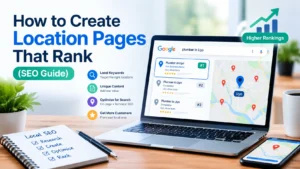
Location pages can help your business reach customers searching for your services in specific cities, towns, and neighbourhoods. When created properly, they make it easier for potential customers to understand where you operate, what you offer, and how they can contact you.
However, simply creating several pages and replacing one city name with another is not enough. Every location page should provide useful information that matches the needs of people in that area.
Whether you run a digital marketing agency, a plumbing company, a restaurant, a real estate business, or a professional service, learning how to create location pages that rank can strengthen your local SEO strategy and help attract more relevant enquiries.
In this guide, you will learn what location pages are, how they work, which keywords to target, what information to include, and how to optimise your pages for traditional search engines and AI-powered search experiences.
Need Help Creating Location Pages That Rank?
Creating location pages that attract local customers takes more than adding a city name to your content. You need the right keywords, unique and useful information, and a clear SEO strategy. If you want to improve your website’s visibility in your target locations, contact James Agbai SEO on WhatsApp to discuss your location page SEO needs.
What Are Location Pages in SEO?
Location pages are website pages created to explain the services a business offers in a particular city, town, neighbourhood, or service area.
For example, a business offering SEO services might have a page targeting customers searching for SEO services in Uyo. That page should explain the services available, who the business helps, how the service works, and how potential customers can make an enquiry.
Real-world example from my SEO work
In my own SEO work, I have tracked visibility for the search term “SEO Expert in Uyo.” The screenshot below shows the result I observed when checking this search.
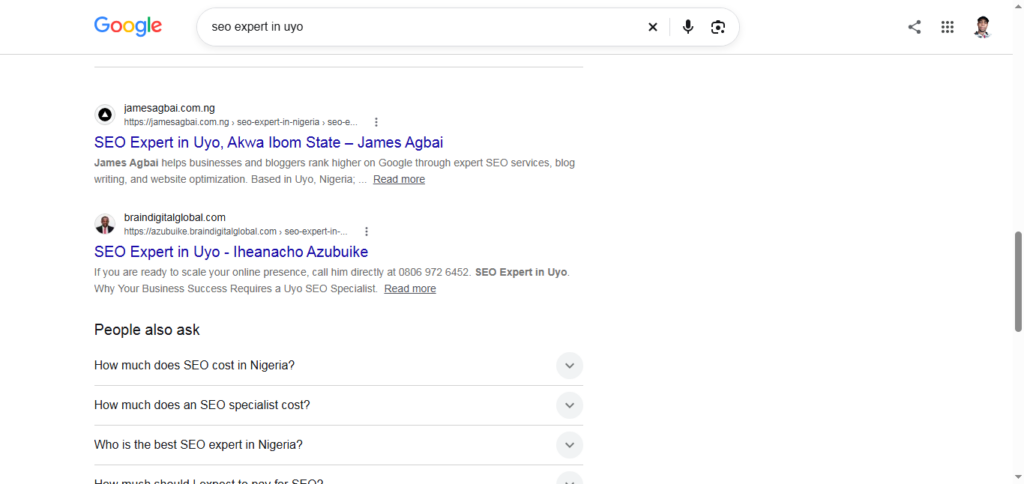
A ranking screenshot provides a useful example of search visibility, but it does not by itself prove that every location page will achieve the same result. The keyword, competition, website, and optimisation work all matter.
Why Are Location Pages Important for Local SEO?
Local SEO helps businesses become more visible when people search for products or services connected to a particular place. Location pages support this process by giving each important service area a clear destination on your website. Here are five benefits of creating useful location pages.
1. They help you target location-based keywords
People often include a city, town, neighbourhood, or region when searching for a service. For example, someone looking for a website designer may search for “website designer in Uyo” rather than simply “website designer.”
A dedicated page can address that specific search by explaining your services, availability, experience, and relevance to customers in Uyo.
2. They provide more relevant information
A general service page may describe what your business does, but it may not answer questions about a particular location.
A location page can explain which neighbourhoods you cover, how customers can reach you, whether appointments are available, and what local customers should know before contacting you. This information helps visitors determine whether your business is suitable for their needs.
3. They can generate qualified enquiries
A visitor who finds a relevant service page for their area may be closer to making a purchasing decision than someone reading a general educational article.
By including clear contact details, service information, genuine reviews, and a useful call to action, you can make it easier for interested visitors to take the next step.
4. They improve website organisation
Location pages can help organise information for businesses with multiple branches or substantial service coverage.
Visitors can find the location most relevant to them, while search engines can discover the relationship between your services, locations, and main website pages through internal links.
5. They support a wider local visibility strategy
Location pages work alongside other local SEO activities, including Google Business Profile optimisation, relevant local citations, customer reviews, technical SEO, and useful content.
They are one part of a broader strategy rather than a replacement for other optimisation work.
How to Create Location Pages That Rank
Creating effective location pages requires planning, relevant information, and careful optimisation. Follow these steps to build pages that help both search engines and potential customers.
Step 1: Choose the Right Locations to Target
Before creating pages, identify the places where your business genuinely operates or provides services.
Start by reviewing your existing customers, service coverage, business locations, and enquiries. If your company already serves customers in several cities, these areas may be sensible starting points.
For example, a Nigerian SEO agency might consider separate pages for Uyo, Lagos, and Abuja if it has a genuine business reason to target customers in those locations.
However, do not create a page for every city simply because you can add its name to a heading.
Ask yourself:
- Do we genuinely serve customers in this location?
- Is there a clear demand for our services here?
- Can we provide useful information specific to this area?
- Can visitors take a meaningful next step after reading the page?
If you cannot answer these questions confidently, reconsider whether the location needs its own page.
It is usually more useful to create a small number of valuable pages than dozens of nearly identical pages.
Step 2: Conduct Local Keyword Research
Keyword research helps you understand how people search for services in specific locations. Begin with your main service keyword, then add relevant geographical terms.
For example, if you provide web design services, possible target keywords include:
- Web design services in Uyo
- Website designer in Uyo
- Web design company in Lagos
- Professional website design in Abuja
- Affordable web design services in Port Harcourt
These are examples, not proof of search volume. Use keyword research tools and actual customer enquiries to identify the phrases most relevant to your business.
Google Search Console can also help you discover queries that already bring impressions or clicks to your website.
Choose one primary keyword theme for each location page. Add related terms naturally where they help explain your services.
Avoid repeating the same keyword unnecessarily. Search engines can understand related wording, and excessive repetition can make your content difficult to read.
Practical tip: Write down the main service, target location, searcher’s likely need, and desired action before drafting each page.
Step 3: Create a Unique Page for Each Important Location
One of the most common mistakes in location page SEO is copying the same content across multiple pages and changing only the place name. For example, imagine creating these two pages:
- SEO Services in Uyo
- SEO Services in Lagos
If both pages contain identical paragraphs, identical claims, and identical service descriptions, with only the city name changed, the second page offers little additional value.
Example: How to improve a location page
Imagine you run a web design business serving Uyo and Lagos.
A weak approach would be to publish two pages with identical content, changing only “Uyo” to “Lagos.”
A stronger approach would be to make each page useful to its intended audience.
For your Uyo page, you might explain your service process, the types of local businesses you help, your appointment arrangements, and how customers can contact you.
For your Lagos page, you could explain the areas you genuinely serve, how remote consultations work, and the process for requesting a quote.
Only include differences that are true. You do not need to invent local projects or pretend to have an office in either city.
The test is simple: would a visitor learn something useful from this page that helps them decide whether your business is right for them?
Instead, use a consistent page structure while providing meaningful information for each location.
Your Uyo page might explain how you work with businesses in Uyo and surrounding areas. A Lagos page could describe a different service arrangement, relevant projects, customer needs, or genuine coverage details where applicable.
Only include information that is accurate.
If your business operates remotely, explain that clearly. Do not claim to have a physical office in a city where you do not have one.
Google warns against creating doorway pages: groups of similar pages designed primarily to rank for related searches and funnel visitors towards the same destination without providing sufficient independent value.
Read Google’s guidance on spam policies for Google web search before creating location pages at scale.
Step 4: Write a Clear and Helpful Page Title
Your page title helps people and search engines understand the subject of the page. Include the main service and location naturally, without making the title unnecessarily long.
Examples include:
- SEO Services in Uyo | Your Business Name
- Professional Plumbing Services in Lagos
- Website Design in Abuja | Your Business Name
Your title should accurately describe what the page offers.
Avoid misleading claims such as “Number One SEO Agency in Lagos” unless you can substantiate the claim and it genuinely represents the page.
Also, avoid stuffing several city names into one title. A page focused on Uyo should not use a title listing every city in Nigeria merely to target more searches.
Step 5: Write a Useful Meta Description
A meta description summarises the page and may appear beneath its title in search results.
Although it is not a direct ranking factor in the usual sense, a relevant description can help searchers understand what they will find on the page.
For example, a page targeting SEO services in Uyo could use:
“Looking for SEO services in Uyo? Discover practical SEO solutions for improving your website visibility, attracting relevant visitors, and generating enquiries.”
Make sure the description reflects the actual content of the page.
Write a distinct description for each important location page rather than copying the same sentence across your website.
Search engines may generate a different snippet based on the search query, so the description is not guaranteed to appear exactly as written.
Step 6: Add Genuine Local Information
This is one of the most important steps when learning how to create location pages that rank.
Your page should provide information that is useful for customers in that particular area.
Depending on your business, you could include:
- The actual business address, where applicable
- Accurate opening hours
- Services available in that location
- Neighbourhoods or areas covered
- Genuine projects completed in the area
- Relevant customer testimonials
- Original photographs
- Local contact or appointment information
- Practical details about visiting or receiving the service
For example, a cleaning company serving Lekki could explain which parts of Lekki it covers, how customers request a quote, and whether residential and commercial cleaning are available.
A business with a genuine branch could include its address, directions, opening hours, and photographs of the premises.
Do not invent local projects, testimonials, addresses, staff members, or customer experiences to make a page appear more relevant. Accurate information builds trust and helps customers make informed decisions.
If you do not have much location-specific evidence yet, explain your actual service coverage and working arrangements instead of fabricating details.
Step 7: Use a Clear and Helpful Page Structure
A well-organised location page should allow visitors to find essential information quickly. You can use the following structure as a starting point.
H1: Main service and location
Example: SEO Services in Uyo
Introduction
Explain what you offer, who you help, and how the page relates to the location.
Services available
Describe the relevant services and what customers can expect.
Areas served
Identify the neighbourhoods or nearby locations you genuinely cover, where relevant.
Why choose your business?
Explain your process, experience, qualifications, or service benefits. Support claims with evidence where possible.
Local proof
Include genuine reviews, relevant project examples, or original photographs if available.
Frequently asked questions
Answer real questions about availability, pricing, appointments, service coverage, or how to get started.
Contact information and call to action
Tell visitors how to request a quote, call, book an appointment, or send an enquiry.
This structure is flexible. A page for a physical branch may need directions and opening hours, while a remote service business may need clearer information about its online working process.
The objective is to make the page useful, not to force every location page into an identical format.
Step 8: Add Relevant Internal Links
Internal links connect one page on your website to another. They help visitors discover related information and help search engines find and understand pages on your site.
For example, a location page for SEO services in Uyo could link to:
- Your main SEO services page
- Your SEO packages page
- A relevant case study
- An article about local SEO
- Your contact page
Use descriptive anchor text that tells readers what to expect when they click.
Instead of repeatedly using “click here,” you could write, “Explore our SEO services” or “Read our guide to local SEO.”
Your main services page can also link to relevant location pages, especially when those pages help visitors choose the appropriate service area.
Avoid adding links simply to increase their number. Every internal link should have a clear purpose.
Example of internal linking for a local SEO website
Suppose you have published a location page targeting SEO services in Uyo. You could connect it to related resources on your website:
- SEO Services: Help visitors understand the services you provide.
- SEO Packages: Give readers a way to compare your available service options.
- Case Studies: Show genuine examples of your SEO work and results.
- Local SEO Guide: Help readers understand the wider strategy behind location-page optimisation.
- Contact Page: Make it easy for interested visitors to enquire.
Use descriptive anchor text and link each phrase to the relevant published page. Do not link to a page that does not exist, and avoid forcing links into paragraphs where they do not fit naturally.
Step 9: Optimise Images and Mobile Experience
Many local searches happen on mobile devices, so your location pages should be easy to use on smaller screens.
Check that visitors can read the content, tap contact links, complete forms, and find important information without unnecessary scrolling or zooming.
Use original photographs where possible. For a physical branch, images of the premises, entrance, team, or service environment can help visitors recognise the location.
Give image files descriptive names and write accurate alt text for meaningful images.
For example, if a photograph genuinely shows your office in Uyo, an appropriate alt text could be “SEO agency office in Uyo.”
Do not describe a generic stock photograph as your actual office.
Also, compress images appropriately, avoid unnecessary scripts, and check page performance. A page that loads slowly or makes contact information difficult to find can frustrate potential customers.
Step 10: Use Structured Data Where Appropriate
Structured data is a type of code that helps search engines interpret information on a webpage.
For eligible businesses, relevant LocalBusiness structured data can describe details such as the business name, address, telephone number, and opening hours.
Google provides documentation on LocalBusiness structured data.
Only include information that accurately reflects the business. The structured data should agree with the visible page content and should not contain invented addresses or misleading details.
A company with several genuine branches may need a carefully planned structure that distinguishes those locations.
However, adding structured data does not guarantee higher rankings or special search result features. It helps communicate information; it does not replace useful content, accurate business details, or technical SEO.
Step 11: Connect Location Pages With Your Google Business Profile Strategy
Website location pages and Google Business Profile serve related but different purposes.
Your website provides detailed information about your services and locations. Your Google Business Profile helps eligible businesses manage how they appear on Google Maps and local search results. For more practical guidance, read our complete guide to Google Business Profile Optimization in Nigeria.
If your business has a genuine eligible location, make sure its public business information is accurate and consistent across relevant platforms.
For service-area businesses, configure the profile according to Google’s rules. Do not create fake offices or separate business profiles simply to target more cities.
A website location page does not automatically create a Google Maps listing, and publishing multiple location pages does not guarantee inclusion in the local map results.
To improve your wider local SEO strategy, combine accurate business information with relevant website content, genuine customer reviews, and a clear description of the services you provide.
Step 12: Help Search Engines Discover and Index Your Pages
Even a useful location page needs to be accessible to search engines. Check the following technical details:
- The page returns a normal successful response.
- It is not accidentally blocked from crawling.
- It does not contain an unintended
noindexdirective. - Its canonical tag points to the appropriate URL.
- Important pages can be reached through internal links.
- Relevant URLs are included in your XML sitemap, where appropriate.
- The page works correctly on mobile devices.
Use Google Search Console to inspect important URLs and review indexing information.
Submitting a sitemap or requesting indexing can help Google discover a page, but neither action guarantees that the page will be indexed or ranked.
If a page is not appearing in search results, investigate the cause rather than creating additional copies of the same page.
Google’s SEO Starter Guide provides further guidance on helping search engines understand your website.
How to Optimise Location Pages for GEO and AI Search
Generative Engine Optimisation, commonly called GEO, involves improving how useful and understandable your content is for AI-powered search and answer experiences.
There is no single GEO technique that guarantees your business will be cited by an AI system. However, several practices can make your location pages more useful and easier to interpret.
Answer important questions directly
Provide clear answers to questions such as:
- What services do you offer in this location?
- Which areas do you cover?
- How can customers contact you?
- Do you have a physical office?
- How does your service work?
Put important information in straightforward language instead of hiding it behind vague marketing statements.
Example: Make your location information easy to understand
A vague statement such as “We provide the best SEO solutions everywhere” does not tell readers which services are available or how to get help.
A clearer statement would be:
“We provide SEO services to businesses in Uyo, including keyword research, on-page optimisation, technical SEO and content strategy. Contact us to discuss your website and confirm whether your business needs are covered.”
This example explains the service, identifies the location and gives the reader a next step. Adapt it to your actual services and service coverage.
Clear, factual information can also help search systems interpret your content. However, no particular wording guarantees that an AI-powered search service will recommend or cite your business.
Use accurate, specific details
Clearly distinguish between a physical business location and an area you serve remotely.
For example, “We provide remote SEO services to businesses in Lagos” communicates something different from “Visit our Lagos office.”
This distinction matters to customers and helps prevent misleading business information.
Demonstrate real expertise
Include relevant experience, explain your process, and provide genuine examples where available.
If you have completed a project for a customer in a particular location and have permission to discuss it, explain the problem, the work performed, and the outcome you can substantiate.
Do not invent statistics, results, or customer stories to make the page sound authoritative.
Keep information consistent
Your business name, address, contact details, service descriptions, and opening hours should be accurate wherever they appear.
Review location pages periodically and update information when your services or operating arrangements change.
These practices improve clarity and trust, although they do not guarantee that an AI search tool will select or cite your page.
Common Location Page SEO Mistakes to Avoid
Even well-intentioned businesses can weaken their local SEO strategy by creating pages without considering their usefulness.
Here are common mistakes to avoid.
1. Publishing duplicate content: Changing only a city name while keeping the rest of the page identical gives visitors little new information.
2. Targeting places you do not serve: Do not imply that you operate in a location when you have no genuine presence or service coverage there.
3. Stuffing keywords: Repeating phrases such as “SEO services in Uyo” unnaturally can make content unpleasant to read.
4. Creating too many pages too quickly: Prioritise locations where you can provide meaningful information and a useful customer experience.
5. Making unsupported claims: Avoid fabricated reviews, misleading rankings, and unverified performance promises.
6. Ignoring conversion: A page may attract visitors but still fail to generate enquiries if its contact details and next steps are unclear.
7. Forgetting maintenance: Outdated phone numbers, opening hours, service areas, and pricing information can confuse customers.
A good rule is to ask whether each page would still be useful to a person who arrived directly from a recommendation rather than a search engine. If the answer is no, improve the page before publishing it.
How to Measure the Performance of Location Pages
After publishing your pages, monitor their performance rather than assuming they are working.
Google Search Console can help you review search impressions, clicks, click-through rates, and average positions for relevant queries and URLs.
Google Analytics or another suitable analytics tool can help you understand what visitors do after arriving on your website.
Depending on your business, useful measures include:
- Organic visits to each location page
- Search queries that generate impressions
- Calls, form submissions, and quote requests
- Appointment bookings
- Qualified enquiries from each area
- Engagement with relevant service pages
If a page receives impressions but few clicks, review its title, description, and relevance to the search queries it appears for.
If it receives visits but few enquiries, check whether the content answers customer questions and whether the contact process is clear.
If a page receives little search visibility, review keyword relevance, indexing, competition, internal links, and the quality of its location-specific information.
Give changes time to be crawled and evaluated, and compare performance over a meaningful period. There is no universal timeline or guaranteed ranking position for a new location page.
Location Page SEO Checklist
Before publishing a location page, use this checklist to review its quality.
- The business genuinely serves or operates in the target location.
- The page has a clear purpose and primary keyword theme.
- The title and meta description accurately describe the page.
- The content includes useful location-specific information.
- Service details and business claims are accurate.
- The page has a clear heading structure.
- Relevant internal links are included.
- Images are appropriate, compressed, and accurately described.
- Contact details and calls to action are easy to find.
- Structured data is accurate, where applicable.
- The page is accessible to search engines and works on mobile devices.
- Performance can be measured through suitable analytics tools.
You do not need to complete every optional enhancement before publishing. Start with accuracy, usefulness, accessibility, and a clear customer journey.
Frequently Asked Questions About Location Pages
How many location pages should a business create?
There is no ideal number for every business. Create pages for genuine locations or service areas where you can provide useful, distinct information. The number should reflect your business operations and customer needs rather than a target for publishing more URLs.
Do location pages help local SEO?
They can help by explaining the services offered in a specific location and connecting relevant searches with useful website information. Their effectiveness depends on factors such as content quality, relevance, competition, technical accessibility, and the wider local SEO strategy.
Should every location page have unique content?
Every page should offer enough distinct value to justify existing separately. Shared design elements and page templates are fine, but the actual information should reflect the location, service, or customer need being addressed.
Can a business rank in a city where it has no office?
A business may attract organic search traffic for areas it genuinely serves without having a physical office there. However, it should describe its service coverage honestly. Google Business Profile eligibility and location requirements are separate considerations, so do not create a fake address or office to appear local.
Does adding LocalBusiness schema guarantee rankings?
No. Structured data helps search engines understand eligible business information, but it does not guarantee indexing, rankings, or enhanced search features.
How long does it take for location pages to rank?
There is no fixed timeframe. Search engines need to discover and evaluate the pages, and results depend on factors including competition, site quality, relevance, and existing authority. Monitor performance and improve pages based on actual evidence.
Final Thoughts
Learning how to create location pages that rank is about more than adding city names to your website. It involves understanding local search intent, choosing the right locations, providing accurate information, and making every page genuinely useful to the people it serves.
Start with the locations where your business has the strongest connection to customers. Research relevant keywords, explain your services clearly, add genuine local details, and connect each page to the rest of your website.
Then review technical accessibility, track search performance, and improve the pages based on real customer needs.
Remember, the best location pages are created to help people choose a business, not simply to occupy more positions in search results.
Need Help Creating Location Pages That Rank?
Creating effective location pages takes more than adding city names to your website. You need relevant keywords, useful location-specific information, a clear internal-link structure and a page that makes it easy for potential customers to contact you.
If you are unsure which locations to target or how to improve your existing pages, contact James Agbai SEO on WhatsApp to discuss your location-page SEO strategy.
We can discuss your target locations, page structure, keyword targeting and opportunities to improve your website’s local search visibility.
Ready to improve your local SEO?
Author Profile

-
James Agbai is an SEO Specialist and Content Strategist with over five years of experience helping businesses, bloggers, startups, and service providers improve their online visibility through ethical, data-driven SEO.
He specializes in technical SEO, content strategy, keyword research, and on-page optimization, with a focus on building sustainable organic growth rather than relying on short-term tactics.
Latest entries
 CONTENT SEOOctober 22, 2026Why Your Blog Posts Are Not Ranking on Google: 15 Reasons and How to Fix Them
 CONTENT SEOOctober 22, 2026How to Build an SEO Topic Cluster (Step-by-Step Guide)
 CONTENT SEOOctober 17, 2026SEO Content Strategy for Nigerian Businesses: A Complete Guide to Getting Found on Google
 TECHNICAL SEOOctober 17, 2026How to Fix 404 Errors in WordPress: A Complete Step-by-Step Guide