
Imagine a potential customer searching Google Maps for a service you offer. Several businesses appear in the results, but yours is nowhere to be found. You have a business, you serve customers, and perhaps you have already created a Google Business Profile. So, why is your business not showing on Google Maps?
This problem can be frustrating, especially for small business owners who depend on local customers to generate sales. When people cannot find your business online, they may choose a competitor instead.
The good news is that a missing Google Maps listing does not always mean something is seriously wrong. Your business profile may be unverified, incomplete, restricted, newly created, or simply not ranking high enough for the search terms customers use.
Understanding the difference is the first step toward solving the problem.
In this guide, you will discover the most common reasons a business does not appear on Google Maps, how to identify the cause, and what you can do to improve your local visibility.
Quick answer: Why is your business not showing on Google Maps?
Your business may be missing from Google Maps because your Google Business Profile is not verified, your business information is inaccurate, your listing is suspended, or your business does not meet Google’s eligibility requirements. If your profile appears when people search for your exact business name but not for general service searches, it may be a local ranking issue rather than a missing listing.
To investigate, check your profile status, verify your business information, review any Google notifications, and test searches using your actual services and location. Follow Google’s official guidance before making major changes to your listing.
1. Your Google Business Profile Has Not Been Verified
One of the first things to check when your business is not showing on Google Maps is whether your Google Business Profile has been verified.
Google Business Profile is a free tool that allows eligible businesses to manage how they appear on Google Search and Google Maps. It can display important information such as your business name, address, opening hours, phone number, website, and customer reviews.
However, creating a profile does not necessarily mean the verification process is complete.
Google uses verification to establish that you are authorized to manage the business information. Depending on your business and circumstances, Google may offer different verification methods.
How to fix this problem
Visit the official Google Business Profile website and sign in using the Google account associated with your business.
Check whether your profile requests verification. If it does, follow the instructions displayed in your account and complete the available verification process.
Avoid creating multiple profiles simply because verification takes longer than expected. Multiple listings for the same business can create additional problems.
You can begin here: Google Business Profile.
After completing verification, allow time for Google to process your information. Verification does not guarantee an immediate top position in search results, but it is an important step toward establishing your business’s presence.
Also Read on Google Business Profile Optimization in Nigeria: Complete Guide
2. Your Business Information Is Incomplete or Incorrect
Another common reason a business does not appear on Google Maps is inaccurate or incomplete information.
Think about what happens when someone searches for a plumber, bakery, pharmacy, or digital marketing agency. Google needs enough information to understand what the business does and whether it is relevant to that person’s search.
If your profile contains very little information, uses an incorrect category, or displays outdated contact details, Google may have difficulty matching it to relevant searches.
For example, a business that provides plumbing services but selects an unrelated primary category may struggle to appear for plumbing-related searches.
How to fix this problem
Review your Google Business Profile and check the following details:
- Business name: Use the genuine name customers recognize.
- Primary category: Select the category that most accurately describes your main business activity.
- Address: Enter the correct physical address if customers visit your premises.
- Phone number: Provide a working business contact number.
- Opening hours: Keep your regular and special hours accurate.
- Website: Add your official website if you have one.
- Services: Describe the actual services your business provides.
Do not add promotional phrases, extra locations, or unrelated keywords to your business name simply to improve rankings. Your profile should represent your real-world business accurately.
For further guidance, read Google’s official advice on improving local rankings.
3. Your Business Profile Is Suspended or Disabled
Sometimes, a business disappears from Google Maps because its profile has been suspended or disabled.
A suspension may occur when Google determines that a profile does not comply with its Business Profile guidelines. In other situations, an account restriction or a problem with the business’s eligibility may affect its visibility.
You might notice that your profile is no longer publicly visible or that you have received a notification explaining that action has been taken.
This situation requires a different solution from ordinary ranking problems. Improving your website or collecting more reviews will not resolve an active profile suspension.
How to fix a suspended profile
First, sign in to the Google account that manages the listing. Look for notifications or restrictions associated with your profile.
Next, review Google’s guidelines and identify any possible issues. Check whether your business name, address, category, ownership details, and other information accurately represent your business.
If you believe the suspension was a mistake, use Google’s official appeals process. Prepare relevant supporting documents when requested, such as business registration records, licences, or utility bills that establish your business’s identity and location.
Do not create another profile for the same business while an appeal is under review. Doing so may complicate the situation.
Google explains the process in its guide to fixing suspended or disabled profiles.
4. Your Business Is Too New
If you have only recently created your Google Business Profile, you may need to give Google time to process and display your information.
New businesses often expect their listings to appear immediately. However, verification, review, profile processing, and search visibility do not always happen at the same time.
Even when a profile becomes publicly available, it may not immediately appear near the top of search results.
For example, a newly opened restaurant might become visible when someone searches its exact name but remain difficult to find for a broader search such as “restaurants near me.”
This does not automatically mean the profile is broken.
How to fix this problem
Confirm that you have completed the required verification steps and that your profile is publicly available.
Check for pending changes or requests for additional information. Make sure your business details are accurate and that you have followed Google’s eligibility requirements.
If your listing is live but does not rank for general searches, focus on improving its relevance and building your business’s online prominence over time.
Avoid repeatedly deleting and recreating your listing in an attempt to speed up the process. That approach may create unnecessary complications.
Patience is important, but it should be combined with proper profile management.
5. You Are Searching for the Wrong Keywords
Your business may already be on Google Maps, but you might not find it when searching for certain services.
This happens because finding a listing by its exact business name is different from ranking for a general service-related keyword.
For instance, suppose you own a company called Bright Path Solutions. Searching for the exact business name may reveal your listing. Searching for “computer repair services” may produce different results because Google must decide which businesses best match that particular query.
Google primarily considers relevance, distance, and prominence when determining local rankings.
Relevance describes how well a business matches the search. Distance concerns how far the business is from the person searching or the location specified. Prominence refers to how well-known the business is.
These factors help explain why your listing may appear for one search but not another.
How to fix this problem
Start by searching for your exact business name and location.
Then try a few realistic searches related to your main products or services. For example:
- Bakery in Port Harcourt
- Plumbing services near me
- Hair salon in my neighbourhood
- Accounting services in Lagos
Use search phrases that accurately describe what your business offers. Test different locations only where they make sense for your actual service area.
If your business appears by name but not for broader searches, investigate your category, services, profile completeness, and local ranking rather than assuming the listing has disappeared.
Remember that no legitimate SEO method can guarantee a first-place Google Maps ranking.
6. Your Business Address or Service Area Is Incorrect
Incorrect location information can affect how Google understands where your business operates.
For businesses with physical premises, the address should match the actual location where customers can visit during the stated business hours.
Service-area businesses work differently. For example, a mobile mechanic, cleaning company, or plumber may travel to customers rather than receive them at a shop.
These businesses can generally configure a service area without publicly displaying their residential or operational address, provided they meet Google’s eligibility and representation rules.
Problems can arise when a business uses a false address, lists a location it does not operate from, or claims to serve areas that do not accurately reflect its operations.
How to fix this problem
Check your address and service-area settings in your Google Business Profile.
If customers visit your premises, make sure the address is correct and the business meets Google’s requirements for displaying that location.
If you travel to customers, configure your profile appropriately and hide your address when required by Google’s guidelines.
Do not use a virtual office, a random residential address, or a rented mailbox simply to appear in another town’s search results.
For more information, review Google’s Business Profile eligibility and ownership guidelines.
Accurate location information helps customers find you and reduces the risk of profile-related problems.
7. Your Business Has Duplicate Listings
Another possible explanation for a missing or poorly performing Google Maps listing is that your business has more than one profile.
Duplicate listings can occur when an owner creates a new profile without realizing an older one already exists. They may also arise when different people independently submit the same business information.
For example, a salon owner might create a new listing after forgetting the login details for the original profile. Instead of recovering access, the owner unintentionally creates a second listing.
This can confuse customers and complicate profile management.
How to fix duplicate listings
Search Google Maps using your business name, address, and phone number to identify possible duplicates.
If you find an existing profile that belongs to your business, investigate whether you can recover access or request ownership.
Follow Google’s official procedures for resolving duplicate profiles rather than deleting listings without understanding their status.
If two genuinely separate businesses operate at the same address, do not assume they are duplicates. Their eligibility depends on the circumstances and whether they operate as distinct businesses under Google’s guidelines.
The objective is to maintain an accurate, legitimate profile for your business, not to create additional listings to manipulate search results.
8. Your Business Has Few Reviews and Limited Online Visibility
Your Google Business Profile might be verified and complete but still appear below competitors.
This is where local SEO becomes important.
Google identifies prominence as one of the main factors influencing local search results. Information such as customer reviews and links from other websites can contribute to how well-known a business appears online.
A competitor with a stronger reputation and greater online presence may be more visible for certain searches.
However, this does not mean you need hundreds of reviews or an expensive marketing campaign before your business can appear on Google Maps.
How to improve your local visibility
Start by delivering a good customer experience and asking satisfied customers to share honest feedback.
Respond professionally to reviews, including negative ones. A helpful response can demonstrate that you take customer concerns seriously.
You can also improve your visibility by:
- Publishing useful information on your website.
- Adding genuine photographs of your premises, products, or completed work.
- Keeping your business details consistent across reputable directories.
- Earning relevant links and mentions from legitimate local websites.
- Participating in community events and building real relationships with other businesses.
- Updating your profile when your services, opening hours, or other important details change.
Never purchase fake reviews or offer incentives in exchange for reviews in ways that violate Google’s policies.
The aim is to build genuine trust, not manufacture popularity.
9. Your Website Does Not Clearly Explain What Your Business Does
Although a website is not always necessary for a business to have a Google Maps listing, a useful website can support your wider local SEO strategy.
Your website gives potential customers more information about your business, products, services, experience, and location.
If your website is vague, outdated, or missing important details, visitors may struggle to understand what you offer. Search engines may also have less useful information to associate with your business.
For example, a cleaning company that offers residential cleaning, office cleaning, and post-construction cleaning should explain those services clearly rather than relying on a homepage that simply says, “We provide quality services.”
How to fix this problem
Create clear pages explaining your main services and the locations you genuinely serve.
Include your business name, contact information, and relevant location details where appropriate.
Publish helpful articles that answer common customer questions. A roofing company, for instance, could explain how to identify roof leaks, when repairs are necessary, and how to maintain a roof during the rainy season.
You can also use structured data, such as appropriate LocalBusiness schema, to help search engines interpret information on your website. However, structured data does not guarantee a Google Maps ranking or a particular search appearance.
Make sure the website is mobile-friendly, easy to navigate, and useful to real customers.
These improvements can strengthen your online presence while supporting your business’s broader local search strategy.
10. Your Business Is Not Eligible for a Google Business Profile
Not every business qualifies for a Google Business Profile.
Google generally requires eligible businesses to make in-person contact with customers during their stated operating hours. This includes businesses that serve customers at an eligible physical location and qualifying service-area businesses that travel to customers.
A business that operates entirely online, without qualifying in-person customer contact, generally does not qualify for a Business Profile.
Other examples of potentially ineligible listings include certain lead-generation businesses, vacant properties, and businesses using addresses that Google does not permit.
If your business does not meet the eligibility requirements, creating additional listings will not solve the problem.
How to check your eligibility
Review Google’s official eligibility rules before creating or modifying your profile.
Make sure your business genuinely operates as described and that you have the authority to represent the location or service.
If you operate an online business, concentrate on other ways to improve your visibility, such as creating a professional website, publishing helpful content, improving organic search rankings, and building a reputable online presence.
Understanding eligibility from the beginning can save time and prevent unnecessary profile problems.
Need help finding the cause?
If your Google Business Profile is verified but still missing from Maps, or you suspect a suspension, a structured review can help identify the next steps.
How to Check Why Your Business Is Not Showing on Google Maps
If you are unsure which issue affects your business, follow this simple troubleshooting process.
Step 1: Search for your exact business name.
Open Google Maps and search for your business name together with your town or city. If the listing appears, check that the address, phone number, and other information are correct.
Step 2: Check your Google Business Profile account.
Sign in to the account used to manage your listing. Look for verification requests, suspension notices, ownership issues, or pending changes.
Step 3: Check whether the profile is publicly visible.
Ask someone else to search for your business or use a private browsing window. This can help you distinguish between a problem with account access and a public visibility issue.
Step 4: Test relevant search terms.
Search for your main service and location, not just your business name. If the profile appears only for the exact name, investigate local ranking factors.
Step 5: Review your business information.
Check your category, address, service area, contact information, opening hours, and services.
Step 6: Investigate policy problems.
If Google has restricted or suspended your listing, follow the official resolution or appeal process before making further changes.
Step 7: Monitor your results.
After correcting a problem, allow time for Google to process the changes. Check your profile and available performance reports to see whether customers are finding you through Search and Maps.
This process helps you identify the likely cause before spending money on advertising or hiring an SEO professional.
How Long Does It Take for a Business to Appear on Google Maps?
There is no single timeframe that applies to every business. The time required can depend on verification, the status of the profile, the type of change submitted, and whether Google needs additional information.
A verified and publicly available profile may be discoverable before it begins ranking well for competitive search terms. These are two separate outcomes.
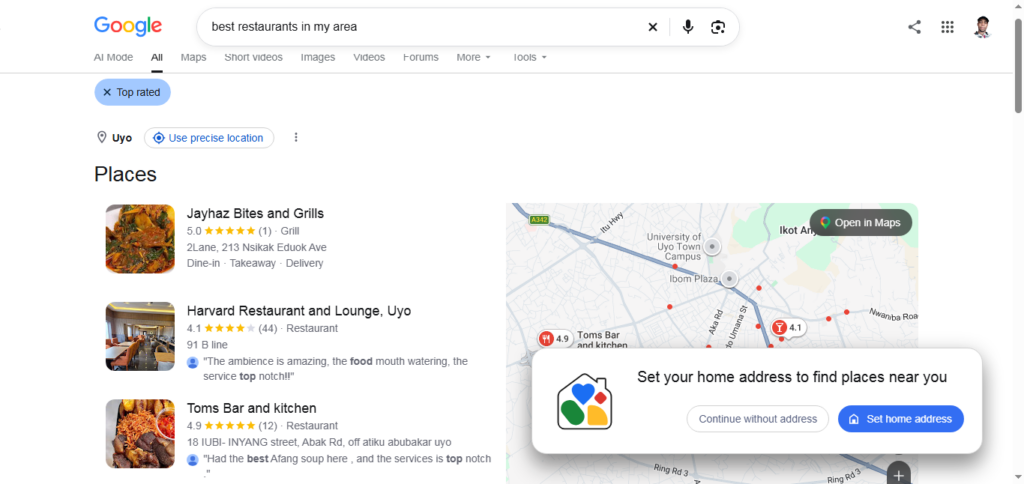
For example, a new restaurant may appear when someone searches its exact name but remain below established restaurants for a broader search such as “best restaurants in my area.”
If your listing has been suspended, simply waiting is unlikely to resolve the issue. You need to address the underlying policy or account problem.
If you have recently edited your profile, check for updates and avoid repeatedly submitting the same changes without a clear reason.
Most importantly, do not trust anyone who guarantees that your business will reach the top of Google Maps within a fixed number of days. Local rankings depend on several factors, and no legitimate provider can guarantee a specific organic position.
Frequently Asked Questions
Why is my business showing on Google Search but not Google Maps?
Your website may appear in ordinary search results even if your Business Profile is missing, unverified, restricted, or not ranking for the query you use. Check your profile status and search for your exact business name in Maps to identify the issue.
Can I add my business to Google Maps for free?
Yes. Eligible businesses can create or claim a Google Business Profile without paying a listing fee. You do not need to purchase advertising to have an eligible business appear in organic local results.
Why does my business appear on Google Maps but not near the top?
Your business may be competing with other relevant local businesses. Google considers relevance, distance, and prominence, so your position can vary according to the search phrase and the searcher’s location.
Do I need a website to appear on Google Maps?
A website is not a universal requirement for an eligible business to have a Google Business Profile. However, a useful website can help customers understand your services and support your wider online visibility.
Can I pay Google to rank my business higher on Maps?
Google does not offer a payment option that guarantees a better organic local ranking. Advertising can provide paid visibility in eligible placements, but it is different from improving your organic Google Maps position.
What should I do if my Google Business Profile is suspended?
Review Google’s guidelines, correct any identified issues, and follow the official appeal process if you believe the suspension was incorrect. Provide supporting documentation when requested, and avoid creating a replacement profile while an appeal is under review.
Want to improve your local visibility?
Get help reviewing your Google Business Profile, local search visibility, and website SEO so you can focus on running your business.
Conclusion
If your business is not showing on Google Maps, the first step is to identify whether your listing is missing entirely or simply not ranking for the searches that matter to you.
An unverified profile, incorrect business information, a suspension, duplicate listings, location problems, or eligibility issues can prevent your business from appearing as expected. In other cases, the listing is live but needs stronger relevance and online prominence to compete effectively in local search results.
Start with the basics: verify your profile, confirm that your information is accurate, check your eligibility, and investigate any warnings in your account. Once your profile is in good standing, work on building a trustworthy online presence through helpful website content, genuine customer reviews, and accurate business information.
Remember that appearing on Google Maps and ranking at the top are different goals. You can take practical steps to improve your chances of being found, but no method guarantees a particular position.
By following the steps in this guide and reviewing Google’s official guidance whenever you encounter a policy issue, you can make informed decisions and give your business a stronger foundation for local online visibility.
Editorial note: This article is intended for general informational purposes. Google Business Profile requirements and processes can change, so consult Google’s current official documentation for account-specific guidance.
Author Profile

-
James Agbai is an SEO Specialist and Content Strategist with over five years of experience helping businesses, bloggers, startups, and service providers improve their online visibility through ethical, data-driven SEO.
He specializes in technical SEO, content strategy, keyword research, and on-page optimization, with a focus on building sustainable organic growth rather than relying on short-term tactics.
Latest entries
 CONTENT SEOOctober 22, 2026Why Your Blog Posts Are Not Ranking on Google: 15 Reasons and How to Fix Them
 CONTENT SEOOctober 22, 2026How to Build an SEO Topic Cluster (Step-by-Step Guide)
 CONTENT SEOOctober 17, 2026SEO Content Strategy for Nigerian Businesses: A Complete Guide to Getting Found on Google
 TECHNICAL SEOOctober 17, 2026How to Fix 404 Errors in WordPress: A Complete Step-by-Step Guide