
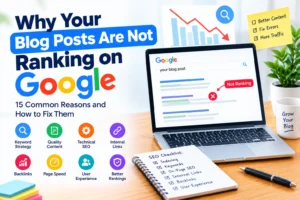
Have you spent hours researching, writing, and publishing blog posts, only to discover that they are nowhere to be found on Google? You are not alone. Many bloggers and website owners experience this problem, even when they publish regularly and follow basic SEO practices.
The frustrating part is that publishing a helpful article does not automatically guarantee that it will appear on the first page of search results. Your blog post may not be indexed, your content may not match what readers are searching for, or competing websites may provide more useful answers.
The good news is that you can investigate these problems and take practical steps to improve your website’s search visibility.
In this guide, you will learn why your blog posts are not ranking on Google, how to identify the problems affecting your content, and what you can do to improve your chances of attracting organic traffic. Whether you are a beginner blogger, a business owner, or a content creator, this article will help you build a more effective SEO strategy.
1. Your Blog Posts Are Not Indexed by Google
One of the first things to check when your blog posts are not ranking is whether Google has indexed them.
Indexing means Google has processed a page and included it in its search index. If a page is not indexed, it generally cannot appear as a normal result in Google Search.
For example, you might publish an article titled “How to Improve Website Speed,” but Google may not have discovered or indexed it yet.
This can happen when your website is new, your internal links are weak, or technical settings prevent Google from accessing your content.
How to fix it
Start by creating or opening your Google Search Console account.
Use the URL Inspection tool to check the exact address of the blog post. Search Console can tell you whether Google has indexed the page and provide information about potential issues.
If the page is not indexed, investigate the reported reason. Check your sitemap, robots.txt file, noindex settings, and page accessibility.
You can request indexing after fixing relevant problems, but Google does not guarantee that every submitted page will be indexed.
Remember that indexing and ranking are different. Getting your article into Google’s index is an important first step, but it does not guarantee high search positions.
2. You Are Targeting the Wrong Keywords
Your blog post may be well written but still struggle to rank because it targets keywords that do not match your audience’s needs.
Keywords are the words and phrases people enter into search engines when looking for information.
For example, a beginner searching for “how to start a blog” probably wants simple instructions. An article focused entirely on advanced server configuration may not satisfy that search.
Similarly, a new website may find it difficult to compete for broad, highly competitive phrases when more specific search terms better match its content.
How to fix it
Research your target audience before writing.
Use Google Search suggestions, related questions, keyword research tools, and Google Search Console to understand what people search for.
Instead of targeting only a broad phrase such as “SEO,” consider a more specific topic such as “how to improve SEO on a WordPress blog.”
Choose a primary keyword that accurately describes your article, then incorporate closely related phrases naturally into the title, introduction, headings, and body.
Do not force keywords into every paragraph. Your goal is to create useful content that answers a real question, not to repeat the same phrase unnecessarily.
3. Your Content Does Not Match Search Intent
Search intent refers to the reason behind a search. Someone searching for “best free keyword research tools” probably wants a comparison of tools, while someone searching for “how to use Google Search Console” needs a practical tutorial.
If your article does not provide the type of information the searcher expects, it may struggle to perform well.
For example, writing a general introduction to SEO when readers want a step-by-step guide to fixing indexing problems may not satisfy their needs.
How to fix it
Before writing or updating an article, search for your target keyword on Google.
Look at the types of pages appearing in the results. Are they tutorials, comparison articles, product pages, detailed guides, or short answers?
Use this information to understand the likely intent behind the query.
You do not need to copy competing pages. Instead, identify the questions they answer, notice what readers may still need, and create a more useful resource.
Make sure your headline accurately reflects the content and that your introduction addresses the reader’s main problem.
4. Your Content Is Too Thin or Does Not Provide Enough Value
Publishing a large number of short articles does not automatically improve your rankings.
A blog post may struggle when it provides only a brief explanation of a topic without answering the questions readers are likely to have.
For example, an article about fixing WordPress errors that simply says “update your plugins and check your settings” may leave readers unsure what to do next.
How to fix it
Improve the usefulness of your content by including:
- Clear explanations of important concepts.
- Practical, step-by-step instructions.
- Relevant examples that illustrate the problem.
- Common mistakes and how to avoid them.
- Answers to related questions.
- Useful references to trustworthy sources.
However, longer content is not automatically better. There is no universal word count that guarantees higher rankings.
A focused article that solves a problem clearly can be more useful than a much longer article filled with repetition.
Write enough to satisfy the reader’s needs, then remove unnecessary information.
5. Your Blog Post Is Competing With Stronger Websites
Some keywords are more competitive than others.
If your website is relatively new, ranking for broad phrases dominated by established websites may take considerable time and effort.
For example, a new personal finance blog may struggle to rank for a broad term such as “investing.” Established financial publishers may have extensive resources, relevant content, and strong reputations.
This does not mean a new blog cannot rank. It means your strategy should reflect the level of competition.
How to fix it
Target specific, relevant topics that your website can address particularly well.
Instead of creating a general article about digital marketing, consider a focused guide on improving local SEO for small businesses in Nigeria, if that matches your expertise and audience.
Build supporting content around related subjects and connect those articles through relevant internal links.
Over time, this approach can help you establish a useful collection of resources around your main topics.
Avoid choosing keywords based on search volume alone. Consider relevance, competition, search intent, and whether the topic is valuable to your audience.
6. Your Blog Post Title Is Not Compelling or Descriptive
Your title helps readers and search engines understand what your page is about.
A vague title may fail to communicate the value of the article. For example, “Some Things About SEO” gives readers little reason to click.
A clear title such as “How to Improve Blog SEO: 10 Practical Steps for Beginners” sets a more specific expectation.
How to fix it
Create a title that accurately describes the article and naturally includes the primary keyword.
For example:
- Weak: “Website Problems”
- Better: “Why Your Blog Posts Are Not Ranking on Google”
- Alternative: “Why Your Blog Is Not Getting Traffic and How to Fix It”
Keep your title relevant to the actual content. Avoid misleading promises or exaggerated claims.
You can also write a descriptive meta description that summarizes the article and encourages interested readers to visit your page.
Google may generate a different search snippet depending on the query, so a meta description does not guarantee that exact wording will appear.
7. Your Website Has Technical SEO Problems
Technical SEO helps search engines access, crawl, and understand your website.
Even useful content may struggle to appear in search results if important pages are blocked, inaccessible, or configured incorrectly. Common technical problems include:
- Accidental noindex directives.
- Incorrect robots.txt rules.
- Broken URLs and redirect errors.
- Server errors and frequent downtime.
- Duplicate URL versions.
- Poor mobile usability.
- Slow page performance.
How to fix it
Use Google Search Console to investigate indexing and crawling problems.
Check important URLs with the URL Inspection tool. Confirm that the pages are accessible, return appropriate responses, and are not accidentally blocked from indexing.
If you use WordPress, review your permalink settings, SEO plugin configuration, and sitemap.
Fix technical problems based on evidence rather than installing multiple plugins in the hope that one will solve everything.
If a problem involves server configuration or custom code, ask your hosting provider or developer to investigate it.
8. Your Website Loads Slowly or Provides a Poor User Experience
Visitors expect websites to work smoothly on both desktop and mobile devices.
If a page takes too long to load, has intrusive pop-ups, or makes its main content difficult to read, visitors may become frustrated.
Google considers several page experience and performance signals, including Core Web Vitals, as part of its broader ranking systems. However, no single speed score guarantees a top position.
How to fix it
Use PageSpeed Insights to assess your website’s performance and identify areas for improvement.
Consider compressing oversized images, reducing unnecessary scripts, using appropriate caching, and choosing reliable hosting.
Make sure your text is readable on mobile devices and that navigation menus and important links work properly.
Avoid overwhelming readers with intrusive advertisements or pop-ups that interfere with the main content.
Focus on improvements that make the website faster, easier to navigate, and more comfortable to use.
9. You Have Weak Internal Linking
Internal links connect related pages within your website.
They help readers discover additional information and help search engines find pages and understand how your content relates.
If you publish many articles without linking them to one another, some pages may be difficult to discover.
For example, an article about keyword research could link to related guides on search intent, on-page SEO, content planning, and Google Search Console.
How to fix it
Review your existing articles and identify relevant opportunities for internal links.
Link from established, related pages to newer articles where the connection is useful.
Use descriptive anchor text that tells readers what the linked page covers.
For example, “learn how to fix WordPress 404 errors” is more informative than repeatedly using “click here.”
Avoid adding links just to increase their number. Every internal link should help readers navigate your website or understand a related topic.
10. Your Blog Has Duplicate or Overlapping Content
Duplicate content occurs when substantially similar information appears at multiple URLs.
A related problem is keyword cannibalization, which can happen when multiple pages on your website target the same or very similar search intent.
For example, you might have three articles that all explain how to improve WordPress SEO, with nearly identical advice and very little difference in purpose.
This can make your content strategy less effective because the articles do not provide distinct value.
However, similar keywords do not automatically mean that pages compete with one another.
How to fix it
Review articles that target overlapping topics and compare their purpose, content, and search performance.
If two pages serve different audiences or answer different questions, keep them distinct and clarify their focus.
If several articles repeat the same information and serve the same purpose, consider combining them into one stronger resource.
Use appropriate redirects when retiring URLs, and ensure canonical tags identify preferred versions when necessary.
The goal is not to reduce the number of articles at all costs. It is to make every important page useful and distinct.
11. You Are Not Building Topic Depth
A blog that publishes unrelated topics may find it difficult to develop a clear, useful resource library for its audience.
Topic depth means covering the important aspects of a subject through a collection of relevant articles.
For example, a website focused on WordPress SEO might publish guides about:
- Keyword research for WordPress.
- Technical SEO for WordPress.
- Fixing WordPress 404 errors.
- Improving blog post rankings.
- Optimizing images for search.
- Using Google Search Console.
These articles can support one another through thoughtful internal linking.
How to fix it
Choose the main topics that matter to your audience and plan supporting articles around them.
Start with a comprehensive pillar post, then publish related articles that address specific questions in greater detail.
Each supporting article should have a clear purpose rather than repeating the pillar post.
A well-organized content library can improve navigation and help readers explore your expertise. It does not guarantee rankings, but it creates a stronger foundation for a useful website. Learn more on How to Build an SEO Topic Cluster (Step-by-Step Guide)
12. Your Content Lacks Original Experience or Trust Signals
Readers want to know whether information is accurate and whether the person providing it understands the subject.
Google’s guidance emphasizes helpful, reliable, people-first content. Demonstrating real knowledge and providing accurate information can improve the quality and credibility of your articles.
Generic articles that repeat common advice without examples or meaningful explanation may offer little reason for readers to choose them over alternatives.
How to fix it
Where relevant, include practical experience, original examples, screenshots, testing results, or explanations of how you reached a conclusion.
Use a clear author biography that accurately describes your qualifications and experience.
Cite reliable sources for technical, statistical, or important factual claims.
Keep articles updated when procedures or recommendations change.
Avoid inventing personal experiences, credentials, testimonials, or results. Trust is built through transparency and accuracy, not unsupported claims.
13. You Are Not Updating Outdated Blog Posts
Some articles lose relevance as tools, technology, regulations, or user expectations change.
For example, a tutorial showing an outdated WordPress dashboard may confuse readers if the interface has changed significantly.
However, not every article requires frequent updates, and changing a publication date alone will not improve its quality.
How to fix it
Use Google Search Console to identify pages that have lost impressions or clicks over time.
Review the article to determine whether the information is still accurate, whether important questions remain unanswered, and whether examples or instructions need improvement.
Update outdated screenshots, broken links, old recommendations, and missing explanations.
Preserve information that remains useful and avoid making unnecessary changes simply to make the article appear fresh.
Prioritize updates that provide a genuine benefit to readers.
14. Your Blog Posts Have Few Relevant Backlinks
Backlinks are links from other websites to your content.
Relevant backlinks can help search engines discover pages and may contribute to understanding a page’s reputation and relevance.
However, you do not need hundreds of backlinks for every article, and a lack of backlinks does not automatically explain poor rankings.
How to improve your chances of earning backlinks
Publish content that others have a reason to reference, such as original research, detailed tutorials, useful resources, or expert explanations.
Promote your work through relevant professional communities and genuine industry relationships.
When appropriate, contribute useful insights to other websites in your field.
Avoid buying manipulative links or participating in schemes designed to artificially influence rankings.
Prioritize relevance and usefulness over the number of links you acquire.
15. You Are Not Measuring Your SEO Performance
Without performance data, it is difficult to know why your blog posts are not ranking or whether your improvements are working.
You may spend time rewriting an article when the actual problem is that the page has not been indexed. Alternatively, your page may receive impressions but very few clicks because its title does not appeal to searchers.
How to fix it
Use Google Search Console to monitor your website’s organic search performance.
Pay attention to:
- Impressions: How often your pages appear in search results.
- Clicks: How often users click through to your website from those results.
- Click-through rate: The percentage of impressions that result in clicks.
- Average position: The average position of your website in the reported search results.
These metrics help you identify patterns, but they do not always reveal the cause of a problem by themselves.
For example, a page with impressions but few clicks may need a clearer title or a better match for search intent. A page with no impressions may require further investigation into indexing, relevance, or competition.
Review the data over a reasonable period and make changes based on evidence.
How Long Does It Take for a Blog Post to Rank on Google?
There is no guaranteed timeframe for ranking a blog post.
Google may discover and index a new page relatively quickly, but ranking it for competitive search terms can take considerably longer. Some articles gain visibility within weeks, while others need months of improvement and may never achieve the positions their owners expect.
The timeline depends on several factors, including the website’s history, content quality, competition, technical accessibility, and the search query.
Instead of focusing on a fixed deadline, monitor whether Google has indexed your content, whether impressions are increasing, and which queries are generating visibility.
Give your content time to perform, but investigate persistent problems rather than assuming that waiting alone will solve them.
A Practical Checklist for Improving Blog Post Rankings
Use this checklist whenever an article is not performing as expected.
- Check indexing: Inspect the URL in Google Search Console.
- Review the keyword: Confirm that it matches the article’s main topic.
- Understand search intent: Make sure the content answers the question users are asking.
- Improve content quality: Add useful explanations, examples, and missing information.
- Review technical SEO: Check crawling, indexing, redirects, and page accessibility.
- Improve the title: Make it descriptive and relevant to the target query.
- Strengthen internal links: Connect the article to relevant pages on your website.
- Check for overlapping content: Make sure the article serves a distinct purpose.
- Improve the user experience: Ensure the page works well on mobile devices and loads efficiently.
- Monitor performance: Use Search Console to measure changes and identify opportunities.
You do not need to fix every item at once. Begin with the issues most likely to explain the article’s poor performance.
Frequently Asked Questions
Why are my blog posts not ranking even after using SEO keywords?
Using keywords is only one part of SEO. Your article may not match search intent, provide enough useful information, be indexed correctly, or compete effectively with other pages. Review the content and technical setup before adding more keywords.
Why is my new blog not getting traffic?
A new blog may have limited visibility because Google has not indexed all its pages, the content targets competitive keywords, or the website has not yet developed a useful collection of relevant resources. Focus on technical accessibility, helpful content, and a realistic keyword strategy.
Does publishing more blog posts improve rankings?
Publishing more articles does not automatically improve rankings. A smaller collection of useful, well-organized articles can be more valuable than many repetitive posts. Focus on content quality, relevance, and the needs of your audience.
Can I rank a blog post without backlinks?
Yes. A blog post can rank without acquiring external backlinks. The importance of links varies by query and competitive landscape, so focus first on useful content, technical accessibility, and a strong internal linking structure.
Should I delete blog posts that do not rank?
Not necessarily. Some articles may need better content, improved internal links, or technical corrections. Delete or consolidate content only when there is a clear reason, and use appropriate redirects when a retired URL has a relevant replacement.
How often should I update my blog posts?
Update articles when information becomes outdated, important details change, links break, or performance data reveals a meaningful opportunity. There is no universal update schedule that guarantees higher rankings.
Need Help Improving Your Blog’s Google Rankings?
If your blog posts are still struggling to gain visibility after you have addressed the basics, there may be deeper issues involving technical SEO, keyword strategy, content quality, or website structure.
At James Agbai SEO, I help businesses, bloggers, and website owners identify SEO opportunities and build practical strategies for sustainable organic visibility.
Get expert guidance on improving your website’s SEO and turning underperforming content into more useful search resources.
Author Profile

-
James Agbai is an SEO Specialist and Content Strategist with over five years of experience helping businesses, bloggers, startups, and service providers improve their online visibility through ethical, data-driven SEO.
He specializes in technical SEO, content strategy, keyword research, and on-page optimization, with a focus on building sustainable organic growth rather than relying on short-term tactics.
Latest entries
 CONTENT SEOOctober 22, 2026Why Your Blog Posts Are Not Ranking on Google: 15 Reasons and How to Fix Them
 CONTENT SEOOctober 22, 2026How to Build an SEO Topic Cluster (Step-by-Step Guide)
 CONTENT SEOOctober 17, 2026SEO Content Strategy for Nigerian Businesses: A Complete Guide to Getting Found on Google
 TECHNICAL SEOOctober 17, 2026How to Fix 404 Errors in WordPress: A Complete Step-by-Step Guide