
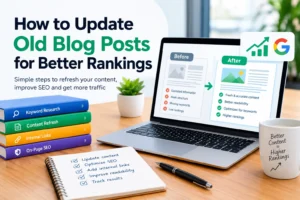
Have you ever published a blog post, watched it attract visitors, and then noticed that its traffic gradually declined? You are not alone. Many website owners experience this problem as information becomes outdated, competitors publish better resources, and readers’ needs change.
The good news is that you do not always need to publish a brand-new article to improve your website’s performance. Updating existing content can help you maintain accuracy, improve the reader experience, and make your articles more competitive in search results.
Learning how to update old blog posts for better rankings is an important part of a sustainable SEO strategy. It allows you to build on work you have already done instead of constantly creating new content from scratch.
In this guide, you will learn how to identify outdated posts, find relevant keywords, improve your content, strengthen internal links, and measure the results of your updates.
What Does It Mean to Update Old Blog Posts for SEO?
Updating old blog posts for SEO means reviewing existing articles and improving their accuracy, usefulness, structure, and relevance to what people are searching for.
This process is sometimes called a content refresh or content update.
For example, imagine you published an article titled “Best Ways to Promote Your Blog” three years ago. Since then, search engines have changed, social media platforms have introduced new features, and some of your recommendations have become outdated.
Instead of abandoning the article, you could replace old advice, add practical examples, answer questions readers commonly ask, and improve the article’s headings and internal links.
The goal is not simply to change the publication date. It is to make the article more useful than it was before.
Search engines aim to provide helpful, relevant results. Although updating a post does not guarantee higher rankings, genuinely improving an article can help it better satisfy the needs of its intended audience.
Also Read On SEO Content Strategy for Nigerian Businesses: A Complete Guide to Getting Found on Google
Why Updating Old Blog Posts Matters
Refreshing existing content can benefit your website in several ways.
1. Keep Information Accurate and Relevant
Readers expect online information to reflect current conditions. Outdated statistics, discontinued products, broken links, and incorrect recommendations can damage trust.
Reviewing your older articles helps you identify information that needs correction or clarification.
For instance, a guide about starting an online business may need updated information about website tools, payment options, or current industry practices.
2. Improve the Reader Experience
An older article may contain long paragraphs, confusing headings, weak examples, or information that is difficult to understand.
You can improve it by using descriptive headings, shorter paragraphs, simple language, and useful examples.
A better reading experience makes it easier for visitors to find answers and understand your recommendations.
3. Address Search Intent More Effectively
Search intent is the reason someone performs a search.
A person searching for “how to update old blog posts for better rankings” probably wants a practical process rather than a general explanation of SEO.
If your article only explains why content updates matter, it may not fully satisfy that reader. Adding a clear checklist, examples, and step-by-step instructions makes the article more relevant to the query.
4. Build on Existing Content
Some older posts may already have backlinks, impressions, visitors, or search engine visibility.
Improving these pages allows you to build on their existing strengths. However, not every old article is worth updating. Some may have little demand, substantial overlap with other pages, or information that is no longer relevant to your audience.
5. Support Long-Term Website Growth
A content refresh strategy helps you maintain the quality of your website over time.
Instead of focusing entirely on publishing new articles, you can balance new content creation with improving existing resources.
This approach is especially useful for websites with large archives of tutorials, product guides, educational articles, and evergreen content.
Step 1: Identify Which Old Blog Posts Need Updating
The first step is deciding which articles deserve your attention.
Updating every post at once is rarely necessary. Begin with pages that show signs of declining performance or have information that needs attention.
Use Google Search Console
Google Search Console is a free tool that helps website owners understand how their pages perform in Google Search.
You can review metrics such as clicks, impressions, click-through rate, and average search position.
Look for articles that:
- Previously attracted organic traffic but now receive fewer clicks.
- Receive impressions but attract relatively few visitors.
- Appear for relevant searches but do not fully answer the questions behind them.
- Rank for keywords that are important to your website.
- Have experienced a noticeable change in performance.
Compare similar periods when possible, taking seasonal trends into account. A decline in traffic does not automatically mean an article needs updating; changes in demand, search results, or competition may also explain it.
Review Your Website Analytics
An analytics tool can show how people interact with your content after visiting your website.
Depending on the information available, review organic sessions, engagement, conversions, and other metrics relevant to your goals.
For example, if an article attracts visitors but does not help them reach the next useful step, you may need clearer explanations, more relevant internal links, or a more useful call to action.
Create a Simple Content Inventory
List your existing articles in a spreadsheet. Include the page URL, title, primary keyword, last substantial update, current performance, and the action required.
Group each article into one of three categories:
- Update: The article remains relevant but needs better information, structure, or coverage.
- Consolidate: Two or more articles cover nearly the same subject and could potentially be combined.
- Leave or remove: The page is already useful, has little improvement potential, or serves no continuing purpose.
Do not delete an article simply because it receives little traffic. Check its purpose, backlinks, relevance, and potential value before making that decision.
Not sure which blog posts need updating? Get help identifying content gaps, SEO issues, and opportunities to improve your existing pages.
Step 2: Research Keywords Before Editing
Keyword research helps you understand the language people use when searching for information.
When updating old blog posts, avoid choosing keywords based only on high search volume. The keyword should match your article’s topic and the reader’s expectations.
Choose One Primary Keyword
Your primary keyword describes the main subject of the article.
For a guide about refreshing existing content, a suitable keyword is “how to update old blog posts for better rankings.”
Use it naturally in important locations, such as the page title, main heading, introduction, and relevant sections where it fits.
You do not need to repeat the exact phrase in every paragraph. Excessive repetition makes content awkward and can be a sign of keyword stuffing.
Add Relevant Secondary Keywords
Secondary keywords describe closely related aspects of the same topic.
Examples include:
- Update old blog posts for SEO.
- Refresh old blog content.
- Improve existing blog post rankings.
- SEO content refresh strategy.
- Optimize existing content.
- Update outdated website articles.
Use these phrases when they help explain a topic naturally. They are not a checklist that requires every phrase to appear a fixed number of times.
Understand What Searchers Want
Search the main keyword and examine the types of results appearing for it.
Look for common characteristics, including tutorials, checklists, examples, and explanations. These can provide clues about what users expect.
Also consider related questions your audience may have, such as:
- How often should old blog posts be updated?
- Should I change the original publication date?
- Can updating old content improve SEO?
- How do I find outdated information?
- How can I measure the results of a content refresh?
Answer relevant questions in your article without adding unnecessary sections just to increase its length.
Step 3: Check the Accuracy of Your Existing Content
Before rewriting anything, read the entire article carefully.
Look for information that has become outdated, unclear, incomplete, or incorrect.
Check the following areas:
Statistics and research: Verify figures against reliable original sources. Replace outdated data when newer, relevant information is available.
Product and service information: Remove discontinued options and correct inaccurate prices, features, or availability claims.
External links: Test links to make sure they lead to relevant, trustworthy resources.
Screenshots and examples: Replace images or examples that no longer reflect the current process.
Recommendations: Review whether your advice still makes sense for your audience.
Legal, financial, and health information: Apply extra care to high-impact topics. Use authoritative sources, provide appropriate context, and avoid presenting uncertain information as fact.
Never invent statistics or sources to make an article appear more authoritative.
If a statement cannot be verified, remove it, qualify it appropriately, or explain the uncertainty.
Step 4: Improve the Article’s Structure and Readability
A well-organized article helps readers find the information they need without unnecessary effort.
Start by reviewing your title and headings.
Your title should clearly communicate the article’s benefit. Instead of a vague heading such as “Some SEO Tips,” use a specific heading such as “How to Refresh Old Blog Posts for SEO.”
Organize the article with one clear main heading and descriptive subheadings. Break long sections into smaller paragraphs and use lists when they make instructions easier to follow.
Explain unfamiliar terms the first time you introduce them.
For example, instead of writing, “Optimize the URL and improve SERP CTR,” write, “Keep your page address clear and review your search click-through rate, which measures how often people click your result after seeing it.”
Add practical examples wherever they make complicated ideas easier to understand.
You should also remove unnecessary repetition. If three paragraphs communicate the same point, combine them into one stronger explanation.
The objective is not to make the article longer. It is to make every section useful.
Step 5: Fill Content Gaps Without Adding Unnecessary Words
Content gaps are important questions or relevant details that your existing article does not address adequately.
You can identify them by comparing your article with the actual needs of your audience, reviewing related search queries, and examining feedback from readers.
Suppose your old article explains how to write a blog post but does not discuss title tags, internal links, or content accuracy.
If those subjects are relevant to the article’s purpose, adding concise explanations may make the resource more complete.
However, do not copy competitors’ wording or add unrelated sections merely because other pages contain them.
Instead, ask three questions:
- What does the reader need to accomplish?
- Which important questions remain unanswered?
- What original example, explanation, or experience can I contribute?
Original insights can include your own testing, documented processes, lessons learned, and clearly explained examples.
A focused article that fully answers a question is generally more useful than a lengthy article filled with repetition.
Step 6: Improve On-Page SEO Elements
On-page SEO involves improving elements on a page to help search engines understand its subject and help readers navigate it.
Review the SEO Title
Your title should be clear, accurate, and appealing to the intended audience.
For example:
“How to Update Old Blog Posts for Better Rankings”
This title communicates the topic directly. Avoid exaggerated promises such as “Guarantee First-Page Rankings Overnight.”
Search engines may display a different title depending on the query and other factors, so an optimized title does not guarantee a particular search result.
Write a Useful Meta Description
A meta description summarizes the page and may appear beneath its title in search results.
A suitable example is:
“Learn how to update old blog posts for SEO with practical tips for keyword research, content improvements, internal links, and performance tracking.”
A meta description can help users understand what the page offers, although search engines may generate a different snippet.
Review the Page URL
Keep the existing URL when possible, especially if the page already attracts visitors or has earned links.
Changing a URL unnecessarily can introduce avoidable problems. If a change is genuinely needed, implement an appropriate permanent redirect and update relevant internal links.
Optimize Images
Use relevant, original, or properly licensed images.
Write descriptive alternative text for meaningful images so people using assistive technology can understand their purpose. Compress large image files and use appropriate dimensions to support page performance.
Avoid filling alternative text with repeated keywords. Describe the image accurately instead.
Step 7: Add Helpful Internal and External Links
Links connect your content with other useful resources.
Internal links point to other pages on your website. They help readers discover related information and help search engines understand relationships between pages.
For example, an article about updating old blog posts might link to your guides on keyword research, technical SEO, and writing useful content.
Choose descriptive anchor text. Instead of using “click here” for every link, use wording that explains what the reader will find.
External links point to other websites. Use them when they help readers verify claims, explore original research, or access authoritative guidance.
Prioritize sources that are relevant and trustworthy, such as official documentation, primary research, and reputable organizations.
You do not need to add dozens of links to every article. A small number of relevant links is better than a collection of unrelated references.
Check existing links during your content refresh and replace broken destinations where appropriate.
Step 8: Demonstrate Experience, Expertise, Authoritativeness, and Trust
Experience, Expertise, Authoritativeness, and Trustworthiness are commonly abbreviated as E-E-A-T in Google’s quality evaluation framework.
E-E-A-T is not a single ranking factor or a score that website owners can directly optimize. It is a useful way to think about the quality and credibility of your content.
You can strengthen these qualities through honest, reader-focused practices.
Share Genuine Experience
When appropriate, include practical examples from work you have actually completed.
If you refreshed an article and measured its performance, explain what you changed, how you measured the result, and what limitations affected your findings.
Do not invent personal experiences or claim that a strategy produced results you cannot substantiate.
Demonstrate Relevant Expertise
Explain technical concepts accurately and clearly. Where a subject requires specialized knowledge, use reliable sources and seek qualified review when appropriate.
Establish Credibility
Provide clear information about the author and website. Maintain a useful About page, identify relevant qualifications when applicable, and make it easy for readers to contact the organization responsible for the content.
Build Trust
Correct errors, disclose material relationships where relevant, distinguish facts from opinions, and avoid misleading claims.
These practices are particularly important for topics that may affect people’s health, finances, safety, or major decisions.
Step 9: Consider GEO and AI Search Visibility
Generative Engine Optimization, often called GEO, refers to improving content so it can be understood, retrieved, and potentially referenced by AI-powered search and answer systems.
Although platforms differ in how they select and present information, clear and reliable content is a sensible foundation.
Here are practical ways to make your articles easier to understand and reference.
Answer questions directly. Begin relevant sections with a concise explanation before expanding on the details.
Use descriptive headings. Headings should accurately represent the questions or subjects covered in each section.
Provide verifiable facts. Support important claims with reliable evidence and identify the context behind statistics.
Explain specialized terms. Avoid assuming every reader understands industry language.
Use structured information where appropriate. Tables, numbered steps, and clearly labeled lists can make processes easier to follow.
Maintain accessible pages. Ensure that important content is available to visitors and that technical settings do not unintentionally prevent appropriate search systems from accessing it.
Keep information consistent. Correct outdated details across related pages when they create confusion.
There is no guaranteed formula for appearing in AI-generated answers. You do not need to publish special AI-only text or repeat keywords excessively. Focus on producing accurate, distinct, helpful information that serves real readers.
Step 10: Review Technical and User Experience Issues
Content quality matters, but technical problems can prevent a good article from performing as intended.
Check whether the page loads properly on mobile devices, whether important content is accessible, and whether images or scripts create unnecessary delays.
Review the following:
- The page returns the correct HTTP status.
- The intended page is indexable.
- The canonical tag points to the appropriate URL.
- The page is not accidentally blocked by robots.txt or a noindex directive.
- Internal links work correctly.
- The mobile layout is readable.
- Important content is not hidden behind broken interactive elements.
If you use a content management system such as WordPress, review your SEO plugin settings and page template.
Do not change technical settings unless you understand their purpose. When in doubt, consult reliable documentation or a qualified professional. Read More On Technical SEO for WordPress: Complete Guide
Step 11: Update the Publication Date Responsibly
A common mistake is changing an article’s publication date without making meaningful improvements.
A new date does not automatically make content better or improve its rankings.
If you make substantial changes, you can display an updated date when it accurately reflects the work completed and matches your website’s editorial policy.
Keep the original publication date available when useful for readers, particularly when an article’s history matters.
Ensure that any structured data used to describe publication or modification dates accurately reflects the visible page information.
The priority is transparency. Readers should be able to distinguish recently reviewed information from content that has not been maintained.
Step 12: Measure the Results After Updating
Publishing an update is not the final step. You need to evaluate whether the changes helped.
Before editing, record the page’s existing performance where data is available. This gives you a baseline for comparison.
After publishing, monitor relevant metrics using Google Search Console and your analytics platform.
Useful measurements include:
Organic clicks: Did the page receive more clicks from unpaid search results?
Impressions: Is the page appearing for relevant queries more frequently?
Click-through rate: Are people clicking the result when it appears? Interpret changes alongside search position and query mix.
Search position: Did the page’s average position change for important searches?
Engagement and conversions: Are visitors finding the information useful and completing relevant actions?
Allow sufficient time for search engines to recrawl the page and for meaningful trends to emerge. Depending on the website and query, results may take days, weeks, or longer.
Compare similar time periods and account for seasonality, changes in search demand, and wider ranking fluctuations.
If performance declines, investigate before making additional changes. The cause may not be the content refresh itself.
Common Mistakes to Avoid When Refreshing Old Blog Content
Even a well-intentioned update can create problems when it focuses on superficial changes rather than reader needs.
Avoid these common mistakes:
Changing only the date: A newer date is not a substitute for useful improvements.
Keyword stuffing: Repeating the same phrase unnaturally can make an article difficult to read.
Deleting useful information: Removing relevant details just to shorten an article can reduce its value.
Copying competitors: Competitor research should reveal opportunities, not encourage plagiarism.
Adding unsupported claims: Never invent statistics, quotations, reviews, or results.
Changing URLs unnecessarily: Preserve established URLs unless there is a clear reason to change them.
Updating everything at once: Prioritize pages based on potential benefit, effort, and business importance.
Expecting instant results: Search performance depends on many factors beyond an individual content update.
Avoiding these mistakes helps you protect your existing content while improving its usefulness.
Old Blog Post SEO Refresh Checklist
Use this checklist whenever you review an existing article.
- Identify the article’s purpose and intended audience.
- Review its current search performance.
- Confirm the primary keyword and search intent.
- Check facts, statistics, and external links.
- Replace outdated advice and examples.
- Improve headings, readability, and organization.
- Fill relevant content gaps.
- Review the SEO title and meta description.
- Add useful internal and external links.
- Check images, alternative text, and mobile usability.
- Review indexing and canonical settings.
- Update publication information accurately.
- Record the changes made.
- Monitor results after publication.
You can save this checklist and use it as a repeatable process for your entire content library.
Frequently Asked Questions
How often should I update old blog posts?
There is no universal schedule. Review time-sensitive articles more frequently than evergreen guides. You can also revisit pages when their traffic declines, their information becomes outdated, or important user questions change.
Does updating old blog posts improve Google rankings?
It can help when the changes make a page more accurate, relevant, useful, or competitive. However, rankings are influenced by many factors, so an update does not guarantee improvement.
Should I rewrite an old blog post completely?
Not necessarily. If the existing article is accurate and useful, targeted improvements may be enough. A complete rewrite may be appropriate when the content no longer matches its purpose or search intent.
Is it better to update old content or publish new articles?
Both can be valuable. Refresh existing pages when there is a clear opportunity to improve them, and publish new articles when your audience has questions that your current content does not adequately answer.
Can I use AI to update old blog posts?
AI tools can help identify unclear passages, organize ideas, and suggest questions to address. However, you should verify facts, review recommendations, protect confidential information, and ensure that the final article offers genuine value. Publishing large quantities of unreviewed, repetitive content is not a substitute for quality.
Should I remove old blog posts that receive no traffic?
Not automatically. Check whether the page serves a purpose, has valuable links, supports another important page, or could attract relevant visitors after improvement. Consolidate or remove content only after evaluating its value and handling redirects where appropriate.
Final Thoughts
Learning how to update old blog posts for better rankings is about more than changing dates or inserting additional keywords. It is about maintaining a useful, accurate, and trustworthy website.
Start by identifying pages with genuine improvement opportunities. Research the search terms your audience uses, correct outdated information, improve readability, strengthen relevant links, and review technical issues.
Support important claims with reliable evidence, share genuine experience, and consider how readers discover information through traditional search engines and AI-powered systems.
Most importantly, measure the results rather than assuming every change will work.
A consistent content refresh strategy can help you make better use of your existing articles, maintain their usefulness over time, and build a stronger foundation for sustainable organic search growth.
Need Help Improving Your Existing Blog Content?
Updating old blog posts can take time, especially when you need to identify ranking problems, review search intent, improve internal links, and check technical SEO issues.
If your website has older articles that are no longer performing as expected, professional SEO support can help you identify opportunities and prioritize the right improvements.
Explore our SEO services to learn how we can help you improve your website’s content and organic search visibility.
No SEO strategy can guarantee a particular ranking, but a careful, data-informed approach can help you make better decisions about your existing content.
Author Profile

-
James Agbai is an SEO Specialist and Content Strategist with over five years of experience helping businesses, bloggers, startups, and service providers improve their online visibility through ethical, data-driven SEO.
He specializes in technical SEO, content strategy, keyword research, and on-page optimization, with a focus on building sustainable organic growth rather than relying on short-term tactics.
Latest entries
 SEO for Nigerian BusinessesOctober 29, 2026How Much Does SEO Cost in Nigeria? A Practical Pricing Guide (2026)
 CONTENT SEOOctober 27, 2026How to Update Old Blog Posts for Better Rankings: A Complete Beginners Guide
 CONTENT SEOOctober 22, 2026Why Your Blog Posts Are Not Ranking on Google: 15 Reasons and How to Fix Them
 CONTENT SEOOctober 22, 2026How to Build an SEO Topic Cluster (Step-by-Step Guide)